Quick answer
A secure https:// page is trying to load something over plain http://. Find every hardcoded http:// reference in your HTML/CSS/JS and change it to https:// (or protocol-relative //) — or add a blanket Content-Security-Policy: upgrade-insecure-requests header to auto-fix every instance at once.
The exact error
Mixed Content: The page at 'https://example.com/' was loaded over
HTTPS, but requested an insecure script
'http://cdn.example.com/widget.js'. This request has been blocked;
the content must be served over HTTPS.

// or, for images/media (a warning rather than a hard block, in
// most current browsers):
Mixed Content: The page at 'https://example.com/' was loaded over
HTTPS, but requested an insecure image 'http://example.com/logo.png'.
This content should also be served over HTTPS.
What it actually looks like
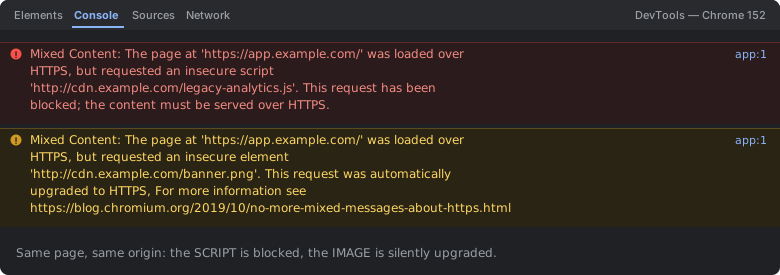
blocked, because it could rewrite the page; passive content (images, video, audio) is silently automatically upgraded to HTTPS. That is why an image often “works” while a script on the same page does not — and why the upgraded image breaks the moment the CDN has no valid HTTPS certificate.The wording difference between "has been blocked" and "should also be served over HTTPS" is meaningful, not incidental — it reflects a deliberate distinction browsers draw between resource types, covered in detail below.
How to read this error in 30 seconds
- Open DevTools Console — every mixed-content resource on the page is listed individually, with its exact URL.
- Check whether it says "has been blocked" (active content: script/stylesheet/iframe — nothing loaded at all) or "should also be served over HTTPS" (passive content: image/media — it loaded, but insecurely, with a browser warning).
- Search your templates/source for the exact hostname/path named in the message.
- If it's not in your own markup, check whether it's coming from stored database content or a third-party embed snippet.
Cause 1 — a hardcoded http:// URL in your own markup or CSS
<!-- ❌ absolute HTTP URL, left over from before the site moved to HTTPS: -->
<script src="http://cdn.example.com/widget.js"></script>

<!-- ✅ explicit HTTPS: -->
<script src="https://cdn.example.com/widget.js"></script>

<!-- ✅ or protocol-relative — inherits whatever protocol the page itself used: -->
<script src="//cdn.example.com/widget.js"></script>
This is the simplest and most common cause: a URL written as an absolute http:// reference somewhere in your HTML, inline <style> block, or an external CSS file's url(...) reference, most often left over from a period before the site adopted HTTPS everywhere, or copy-pasted from documentation/an example that predates the provider's own move to HTTPS. The fix is a direct search-and-replace to https://, or switching to a protocol-relative URL (//host/path, with no scheme at all) which automatically matches whatever protocol served the current page — a pattern that was especially popular during the industry-wide HTTP-to-HTTPS transition years ago specifically to avoid this exact class of bug.
Cause 2 — stored database/CMS content still has old absolute HTTP URLs
-- find every stored post/page body still referencing plain HTTP:
SELECT id, title FROM posts WHERE content LIKE '%http://%';

-- a one-time cleanup pass — swap the scheme in already-stored HTML
-- (adjust the domain/pattern to match your own migration):
UPDATE posts
SET content = REPLACE(content, 'http://example.com/', 'https://example.com/')
WHERE content LIKE '%http://example.com/%';
Content that lives inside a database — blog post bodies, page builder content, user-submitted HTML — is fundamentally different from your template code: migrating the site's own delivery to HTTPS changes nothing about strings already sitting in stored rows. Every historical post or page that embedded an absolute http:// image, iframe, or script URL keeps referencing that scheme indefinitely, since nothing about a protocol migration retroactively rewrites already-persisted content. This is why mixed-content errors often surface specifically on older content and not on anything published after the HTTPS migration — new content is written with the correct scheme from the start, while old content silently carries the bug forward until it's explicitly cleaned up.
Cause 3 — a third-party embed/widget snippet you don't control
<!-- an old copy-pasted widget snippet, hardcoded to HTTP by
     whoever wrote it, possibly years ago: -->
<script src="http://widgets.thirdparty.com/embed.js"></script>

<!-- check the provider's current docs for an HTTPS-compatible
     snippet before assuming none exists — most services updated
     theirs years ago and just never told existing integrators -->
Unlike Causes 1 and 2, this one isn't fixable by editing your own code at all — the mixed content originates from markup served by a third party's domain, entirely outside your control. The practical fix is checking whether the provider now offers (almost all mainstream ones do, at this point) an HTTPS version of the same embed snippet and swapping to it, or, if the integration is genuinely abandoned/unmaintained by its provider, removing it and finding an alternative rather than leaving a permanently broken, insecure dependency on the page.
Cause 4 — the resource genuinely isn't available over HTTPS at all
# confirm whether HTTPS is actually available at that host before
# assuming a simple scheme swap will work:
curl -I https://cdn.example.com/widget.js
# a connection failure or certificate error here means the resource
# truly has no HTTPS endpoint — the fix is finding a different host
# for that resource, not just changing http:// to https:// in place
Occasionally the underlying resource is hosted somewhere that has never had TLS configured at all — an old internal tool, an abandoned CDN bucket, a legacy asset server nobody migrated. In this case, simply rewriting the URL's scheme to https:// produces a new, different failure (a connection error or certificate mismatch) rather than fixing anything, because there's genuinely nothing listening for HTTPS at that host. The actual fix here is either self-hosting the resource on infrastructure that does support HTTPS, or finding an alternative HTTPS-capable source for the same asset.
The blanket fix: Content-Security-Policy upgrade-insecure-requests
<!-- add to your page's <head>, or set as a response header instead: -->
<meta http-equiv="Content-Security-Policy" content="upgrade-insecure-requests">

# or as an actual HTTP response header (nginx example):
add_header Content-Security-Policy "upgrade-insecure-requests";
This directive tells the browser to automatically rewrite every http:// subresource URL on the page to https:// before it's ever requested, rather than blocking or warning about it. It's a genuinely useful, low-effort mitigation specifically for Causes 2 and 3 above — cases where finding and manually fixing every individual instance (scattered across years of stored content or embedded in third-party markup) is impractical — but it only works when the same resource is actually reachable over HTTPS at the same hostname; if it isn't (Cause 4), the upgraded request simply fails outright rather than silently falling back to the insecure version, which is the correct, secure behavior even though it doesn't magically fix an HTTPS-incapable host.
Common variants
| Resource type | Browser behavior |
|---|---|
| script, stylesheet, iframe (active content) | blocked outright — nothing loads |
| image, video, audio (passive content) | historically loaded with a warning; modern browsers increasingly auto-upgrade or block these too |
fetch()/XHR to an HTTP endpoint | blocked outright, same as active content |
a form action pointing at HTTP | flagged with a distinct, more visible browser warning at submission time |
Debugging checklist
- ✓ Read every mixed-content line in the DevTools Console — each names the exact blocked URL
- ✓ Search your templates/CSS for the exact hostname/path named
- ✓ If not found in your markup, check stored database/CMS content for old absolute HTTP URLs
- ✓ If it's a third-party embed, check for an HTTPS-compatible version of that snippet
- ✓ Confirm the target host actually supports HTTPS (
curl -I https://...) before assuming a scheme swap alone will work - ✓ Consider
Content-Security-Policy: upgrade-insecure-requestsas a blanket mitigation for hard-to-reach instances
Frequently Asked Questions
What does "was loaded over HTTPS, but requested an insecure resource" mean?
The page itself was served securely over HTTPS, but something on that page — a script, stylesheet, image, font, or a fetch()/XHR call — points at a plain http:// URL. Browsers restrict or fully block this "mixed content" because a plain-HTTP subresource can be intercepted or tampered with by a network attacker even though the surrounding page was delivered securely, undermining the whole point of using HTTPS.
Why do images sometimes still load (with a warning) while scripts are blocked outright?
Modern browsers distinguish between "passive" mixed content (images, video, audio — displaying tampered media is a real but comparatively limited security risk) and "active" mixed content (scripts, stylesheets, iframes — content that can execute code or fully rewrite the page, which is a much more severe risk). Passive content historically loaded with a warning; active mixed content is blocked outright in current browsers, and increasingly even passive/image mixed content is now auto-upgraded to HTTPS or blocked as browsers tighten the policy over time.
Why does this show up after a database/CMS content migration to HTTPS?
Content stored in a database — blog post bodies, CMS page content, user-uploaded HTML — often has absolute http:// URLs baked into it from before the site moved to HTTPS. Switching the site's own protocol doesn't retroactively rewrite URLs sitting inside stored content, so every old post/page that embedded an absolute HTTP image or iframe URL continues serving mixed content indefinitely until that stored content itself is updated.
What does the Content-Security-Policy upgrade-insecure-requests directive actually do?
It instructs the browser to automatically rewrite any http:// subresource URL on the page to https:// before making the request, rather than blocking it outright. This is a highly effective blanket fix for cases where you can't practically find and edit every hardcoded HTTP reference (e.g. old database content, third-party widget snippets you don't control) — provided the resource is actually available over HTTPS at the same host; if it isn't, the upgraded request simply fails instead of falling back to HTTP.
Can a third-party widget or ad script cause mixed content even though my own site is fully HTTPS?
Yes — an embed snippet from a third-party service (an old widget, analytics tag, or ad network) can itself be hardcoded to load additional resources over plain HTTP, entirely outside your control over your own markup. The fix is either switching to that provider's HTTPS-compatible embed snippet (most have one) or removing the integration if none exists, since you can't edit code served from someone else's domain.
How do I find every instance of mixed content on a large, existing site?
Browser DevTools' Console tab lists every blocked/warned mixed-content resource for the current page load, but for a full-site audit, a crawler-based online mixed-content checker or a simple site-wide grep for literal "http://" strings in your templates, CSS, and database content is more practical than manually visiting every page.
References
- Mixed content (MDN)
- upgrade-insecure-requests (MDN)
More network & security errors
Browse the full reference for network, TLS, and browser security errors — exact message, cause, and fix.