Quick answer
Your actual request never left the browser. A separate, automatic OPTIONS request (the "preflight") was sent first to ask permission, and the server's response to that request — not your real one — failed CORS validation. The fix is almost always: make your server respond correctly to OPTIONS for that route, with the right Access-Control-Allow-* headers.
The exact error
Access to fetch at 'https://api.example.com/users' from origin
'https://app.example.com' has been blocked by CORS policy:
Response to preflight request doesn't pass access control check:
It does not have HTTP ok status.
What it actually looks like
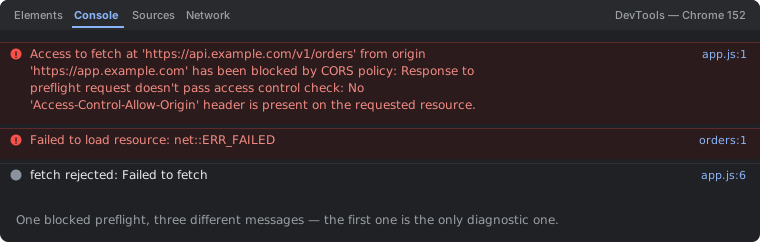
OPTIONS with 204 and no CORS headers. One block produces three messages, and only the first names the actual cause — which is why Failed to fetch and net::ERR_FAILED are such common and misleading things to search for.The message can also end with variants like "No 'Access-Control-Allow-Origin' header is present on the requested resource" or "The value of the 'Access-Control-Allow-Origin' header in the response must not be the wildcard '*' when the request's credentials mode is 'include'" — all describing the same underlying mechanism failing for different specific reasons, covered as separate causes below.
How to read this error in 30 seconds
- Open DevTools → Network tab, reload, find the OPTIONS request to the same URL (it sits directly before your real GET/POST/PUT request).
- Check its status code — anything other than a 2xx response fails the preflight outright, regardless of what headers it returns.
- Check its response headers for
Access-Control-Allow-Origin,Access-Control-Allow-Methods, andAccess-Control-Allow-Headers— the Console's error text usually names exactly which one is missing or wrong. - Confirm whether your request sends credentials (cookies,
Authorizationheader withcredentials: 'include') — this changes what's a validAllow-Originvalue, covered in Cause 3 below.
The preflight flow, visually
Steps 1–3 are a separate round trip that happens automatically before your request. Your fetch() and your route handler both live at step 4 — if step 3 fails, neither runs.
The key thing this diagram makes visible: steps 1–3 are a completely separate round trip that happens automatically, entirely inside the browser and network stack, before your application code's request is ever attempted. Your fetch() call and your server's real route handler both live at step 4 — if step 3 fails, execution never reaches either one, which is why debugging your actual endpoint's logic is a waste of time until the preflight itself passes.
Cause 1 — there's no route/handler for OPTIONS at all
// ❌ only a GET handler exists — an OPTIONS request to this same
//    path has nothing to match, and most frameworks 404 it by default:
app.get("/users", (req, res) => res.json(getUsers()));

// ✅ Express's built-in cors() middleware auto-handles OPTIONS for
//    every route it's applied to — this is the standard, low-effort fix:
const cors = require("cors");
app.use(cors({ origin: "https://app.example.com" }));
app.get("/users", (req, res) => res.json(getUsers()));
Many web frameworks route incoming requests strictly by method + path, meaning a route registered only for GET genuinely has no matching handler for an OPTIONS request to the identical path — the framework falls through to a default 404 or 405 response, which fails the preflight's "must return a 2xx status" requirement before any CORS headers are even considered. Reaching for a maintained CORS middleware (cors for Express, django-cors-headers for Django, flask-cors for Flask) rather than hand-rolling OPTIONS handling is the standard fix, since these libraries register the necessary catch-all OPTIONS behavior for you across every route automatically.
Cause 2 — a hand-rolled OPTIONS handler is missing a required header
// ❌ handles OPTIONS but forgets Allow-Methods and Allow-Headers —
//    the preflight then fails for any non-GET method or custom header:
app.options("/users", (req, res) => {
  res.set("Access-Control-Allow-Origin", "https://app.example.com");
  res.sendStatus(204);
});

// ✅ a preflight response needs all three, matching what the actual
//    request will use:
app.options("/users", (req, res) => {
  res.set("Access-Control-Allow-Origin", "https://app.example.com");
  res.set("Access-Control-Allow-Methods", "GET, POST, PUT, DELETE");
  res.set("Access-Control-Allow-Headers", "Content-Type, Authorization");
  res.sendStatus(204);
});
A hand-written OPTIONS handler is a common source of partial CORS support: it's easy to add Access-Control-Allow-Origin (the header most people know about) while forgetting that Access-Control-Allow-Methods and Access-Control-Allow-Headers are independently checked against what the actual request intends to send. If your real request will use PUT or send an Authorization header, the preflight response must explicitly list both — the browser cross-references the preflight's allow-list against the upcoming real request and fails validation if anything the real request needs isn't pre-authorized here.
Cause 3 — wildcard origin used with credentialed requests
// client sends credentials:
fetch("https://api.example.com/users", { credentials: "include" });

// ❌ wildcard is explicitly disallowed once credentials are involved —
//    the spec forbids this combination for security reasons:
res.set("Access-Control-Allow-Origin", "*");

// ✅ echo back the exact requesting origin instead, plus explicitly
//    allow credentials:
res.set("Access-Control-Allow-Origin", req.headers.origin);
res.set("Access-Control-Allow-Credentials", "true");
The CORS specification deliberately forbids Access-Control-Allow-Origin: * whenever the request carries credentials (cookies, HTTP auth, or a client-set Authorization header combined with credentials: 'include'/withCredentials: true) — a wildcard combined with credentials would let literally any origin on the internet make authenticated requests on a logged-in user's behalf, which is precisely the cross-site request forgery scenario CORS exists to prevent. The correct pattern is to reflect the specific requesting origin (read from the incoming Origin request header, validated against an allow-list server-side) rather than a wildcard, alongside an explicit Access-Control-Allow-Credentials: true.
Cause 4 — a reverse proxy or CDN strips CORS headers before they reach the browser
# confirm what actually reaches the browser vs. what your app sent —
# curl the same OPTIONS request directly against the proxy/CDN edge:
curl -X OPTIONS -i https://api.example.com/users \
  -H "Origin: https://app.example.com" \
  -H "Access-Control-Request-Method: PUT"
# compare against curling the origin server directly, bypassing the
# proxy, if you have a way to do so (internal IP, different port)
Your application code can return perfectly correct CORS headers and still fail this check if an nginx configuration, a load balancer, or a CDN edge rule in front of it strips or rewrites headers on the response path — a common outcome of an overly aggressive proxy_hide_header directive, a caching layer that caches an earlier response missing the headers, or a WAF rule that isn't aware CORS headers need to pass through untouched. Comparing what your application actually sent against what the browser actually received (via a direct curl to the origin vs. through the full proxy chain) isolates whether the bug is in your CORS logic or in infrastructure sitting in front of it.
Common variants
| Message ending | Meaning |
|---|---|
| "...It does not have HTTP ok status" | the OPTIONS request itself returned a non-2xx status (404/405/500) |
| "No 'Access-Control-Allow-Origin' header is present" | the OPTIONS response is missing the header entirely |
| "...must not be the wildcard '*' when the request's credentials mode is 'include'" | wildcard used alongside a credentialed request (Cause 3) |
| "Method X is not allowed by Access-Control-Allow-Methods" | the preflight response's method allow-list doesn't include the real request's method |
Debugging checklist
- ✓ Find the
OPTIONSrequest in DevTools Network tab and check its status code first - ✓ Confirm
Allow-Origin,Allow-Methods, andAllow-Headersare all present and match what your real request needs - ✓ If using credentials, confirm the origin is echoed literally, not wildcarded
- ✓ curl the OPTIONS request directly to rule out a proxy/CDN stripping headers
- ✓ Prefer a maintained CORS middleware over hand-rolled OPTIONS handling
Frequently Asked Questions
What does "response to preflight request doesn't pass access control check" mean?
Before sending certain cross-origin requests (typically anything other than a simple GET/HEAD/POST with plain form-encoded bodies), the browser automatically sends a separate OPTIONS request first, called a preflight, asking the server for permission. This error means the server's response to that OPTIONS request didn't satisfy the browser's CORS rules — so the browser never sent your actual request (the GET/POST/PUT/DELETE you intended) at all.
Why does my server's actual route handler never even run?
Because the OPTIONS preflight request is a completely separate HTTP request the browser sends automatically, before your real request. If the server doesn't have a route/handler that responds correctly to OPTIONS for that path with valid CORS headers, the preflight fails and the browser aborts the entire operation right there — your actual GET/POST handler is never invoked, so adding CORS headers only to your normal route handler does nothing, since it's never reached.
Which requests actually trigger a preflight, and which don't?
A request counts as a "simple request" (no preflight) only if it uses GET, HEAD, or POST, sets no custom headers beyond a small allowed set, and its Content-Type is one of application/x-www-form-urlencoded, multipart/form-data, or text/plain. Anything else — a PUT/DELETE/PATCH method, a custom header like Authorization or X-API-Key, or a JSON body with Content-Type: application/json — triggers a preflight OPTIONS request first.
Does adding Access-Control-Allow-Origin to my regular route fix a preflight failure?
No, not on its own — the preflight OPTIONS request needs its own valid response with the appropriate Access-Control-Allow-Origin, Access-Control-Allow-Methods, and (if applicable) Access-Control-Allow-Headers, independent of whatever headers your actual GET/POST/PUT handler returns. Many frameworks' CORS middleware handles both automatically, but a hand-rolled or misconfigured setup can easily cover the real endpoint while leaving OPTIONS unhandled or returning a non-2xx status.
Can Access-Control-Allow-Origin: * ever fail a preflight check?
Yes, in one specific and easy-to-miss case: the wildcard * is not permitted as the Access-Control-Allow-Origin value on a preflight response for a request that also sends credentials (cookies or an Authorization header alongside credentials: 'include'). Credentialed requests require the server to echo back the exact requesting origin as a literal string, not the wildcard, or the preflight is rejected even though the header is present.
How do I see exactly which part of the preflight response failed?
Open DevTools Network tab, find the OPTIONS request to the same URL (it appears as a separate entry right before your actual request), and check its response headers and status code — the Console tab's CORS error message also usually names the specific missing or mismatched header (Allow-Origin, Allow-Methods, or Allow-Headers) that caused the rejection.
References
- Preflighted requests (MDN)
- OPTIONS (MDN)
More CORS & network errors
Browse the full reference for CORS, network, and browser security errors — exact message, cause, and fix.