⚡ Fastest fix
The TLS handshake itself failed — before any certificate was even evaluated. The #1 cause is visiting an https:// URL for a server that's only listening on plain HTTP. Try the same address with http:// first:
https://localhost:3000/   ❌ ERR_SSL_PROTOCOL_ERROR
http://localhost:3000/    ✅ loads fine — the server was never running TLS at all
What you're seeing
This site can't provide a secure connection
localhost sent an invalid response.
ERR_SSL_PROTOCOL_ERROR

// in a background request, the browser console instead shows:
Failed to load resource: net::ERR_SSL_PROTOCOL_ERROR
What it actually looks like
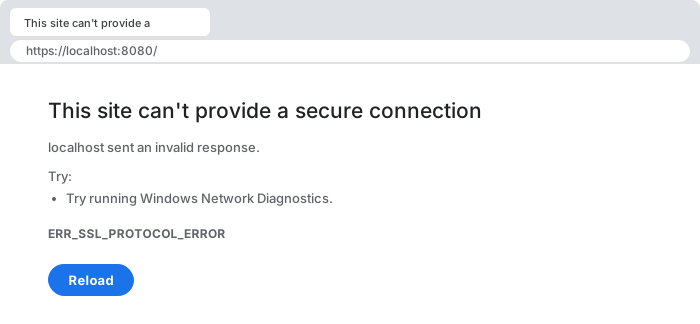
https:// against a port serving plain HTTP. Sent an invalid response is literal: the server answered, but with something that was not a TLS handshake. That is why this so often turns out to be a port or scheme mistake rather than a certificate problem.Unlike a certificate-trust error, there is usually no "Advanced → Proceed anyway" option here at all — because the failure happens before a certificate was ever presented for the browser to evaluate. That absence of a click-through option is itself a diagnostic clue: it tells you the problem is at the handshake/protocol layer, not the certificate-trust layer covered by ERR_CERT_AUTHORITY_INVALID.
30-second triage
- A local dev server or a specific non-standard port? → Fix 1 (HTTP vs HTTPS mismatch)
- Your own Node/Express HTTPS server, even with a certificate configured? → Fix 2 (wrong server constructor)
- An old embedded device or legacy appliance? → Fix 3 (TLS version mismatch)
- Only on one network, affecting many sites? → Fix 4 (proxy/antivirus TLS interception)
Fix 1 — HTTP vs HTTPS confusion (the overwhelming majority of cases)
When: a local dev server, an internal tool, or any address you're not 100% sure is actually running TLS.
# confirm which protocol the server is actually speaking on that port:
curl -v http://localhost:3000/    # if this succeeds, there's no TLS here at all
curl -v https://localhost:3000/   # this is the one that should fail identically to the browser

# a typical Express dev server only ever does this — plain HTTP:
const app = require("express")();
app.listen(3000);   // http.createServer under the hood — no TLS involved
Most local development servers (Express, Django's runserver, Vite's default dev server, and dozens of others) bind plain, unencrypted HTTP by default — TLS is opt-in, extra configuration most tutorials skip entirely for local work. A bookmark, browser autocomplete, or muscle memory that adds https:// out of habit will send a TLS handshake to a socket that only ever speaks plain HTTP. The server has no idea what to do with the encrypted handshake bytes it receives and responds with something that isn't a valid TLS response at all, which the browser reports as this generic protocol error rather than anything more specific, because from the browser's perspective the "server" simply isn't speaking TLS.
Fix 2 — your own Node/Express server: check which constructor actually got the cert
When: you wrote the server yourself, configured a certificate, and it still fails.
const fs = require("fs");
const https = require("https");
const http = require("http");   // ⚠️ easy to import both and mix them up
const app = require("express")();

const options = {
  key: fs.readFileSync("key.pem"),
  cert: fs.readFileSync("cert.pem"),
};

// ❌ the certificate options are created but never actually used —
//    this line creates a plain, unencrypted HTTP server regardless:
http.createServer(app).listen(3000);

// ✅ pass the options to the HTTPS constructor specifically:
https.createServer(options, app).listen(3000);
This is a surprisingly common and easy-to-miss local-dev bug: having both http and https imported, building a valid-looking options object with your key and certificate, and then passing your Express app to http.createServer(app) instead of https.createServer(options, app) out of habit or a copy-paste from an older, HTTP-only version of the file. The certificate files are read from disk successfully and no error is thrown at startup — the mistake only surfaces when a browser tries to speak TLS to a socket that's quietly serving plain HTTP underneath, producing exactly this handshake failure.
Fix 3 — the server only supports an obsolete TLS version
When: the target is an older embedded device, an industrial/IoT appliance, or a legacy internal system with a frozen software stack.
# check which protocol versions the server actually offers:
openssl s_client -connect device.local:443 -tls1
openssl s_client -connect device.local:443 -tls1_1
openssl s_client -connect device.local:443 -tls1_2
# if only the -tls1 / -tls1_1 attempts succeed, the device is stuck on
# a protocol version every modern browser has deliberately removed
All major browsers formally deprecated and removed TLS 1.0 and TLS 1.1 support starting around 2020, following an industry-wide push (led by the same browser vendors, the IETF, and PCI compliance standards) to retire protocol versions with known cryptographic weaknesses. A server that has never been updated — common on network hardware, printers, older enterprise software, and industrial control systems with multi-year (or multi-decade) refresh cycles — may only be capable of the versions browsers now refuse outright, producing this handshake failure with no possible client-side workaround; the device's own TLS configuration has to be upgraded, or you fall back to a tool that still permits legacy TLS (accepting the real security trade-off that implies) for that connection specifically.
Fix 4 — a corporate proxy or antivirus with a broken TLS implementation
When: the failure is reproducible against many otherwise-healthy public sites, but only from one specific network or VPN.
# reproduce off that network (mobile hotspot, home connection) to
# rule out the site itself:
curl -v https://example.com/   # succeeds elsewhere, fails only on the suspect network

# on Windows, a common culprit is HTTPS-scanning antivirus —
# temporarily disabling it (if policy allows) isolates the cause quickly
This is rarer than the certificate-trust variant of network interception (most modern inspection proxies handle the handshake correctly and only substitute their own certificate afterward, which produces ERR_CERT_AUTHORITY_INVALID instead), but a poorly implemented or outdated TLS-inspection layer can fail the handshake itself. If disabling the suspect software or switching networks entirely resolves it, the fix belongs to whoever administers that network or security product, not to the site you were trying to reach.
Why this happens: handshake failures vs certificate failures
This error is a phase-1 failure — no certificate is ever presented, so reinstalling a root CA or editing trust settings can't help.
It's worth being precise about where in the TLS connection process this error occurs, because it changes what's worth investigating. A TLS connection has (roughly) two phases: first, the handshake — the client and server negotiate a shared protocol version and cipher suite, and exchange the cryptographic material needed to establish an encrypted channel; only after that succeeds does the server present its certificate for the client to validate against its trust store. ERR_SSL_PROTOCOL_ERROR is specifically a phase-one failure: the two sides couldn't even agree on how to talk, so there was never a certificate for the browser to evaluate in the first place. That's structurally different from ERR_CERT_AUTHORITY_INVALID, which is a phase-two failure — the handshake completed fine, a certificate was presented, and the trust chain on that certificate is what failed. Recognizing which phase you're in immediately rules out an entire category of fixes: if you're getting this protocol-level error, reinstalling a root CA or adjusting certificate trust settings will do nothing, because the browser never got far enough to look at a certificate at all.
Common causes at a glance
| Situation | Root cause | Fix |
|---|---|---|
| local dev server, wrong scheme | server only speaks plain HTTP | use http://, or actually enable TLS |
| your own Node/Express HTTPS server | certificate options passed to the wrong constructor | use https.createServer(options, app) |
| old device/appliance | only supports TLS 1.0/1.1, browser removed those | upgrade the device's TLS stack |
| only on one network, many sites fail | broken proxy/antivirus TLS inspection | fix or bypass that network's inspection layer |
Debugging checklist
- ✓ Try the exact same address with
http://instead ofhttps://first - ✓ Your own server? Confirm the TLS options actually reached
https.createServer, nothttp.createServer - ✓ Old device? Test with
openssl s_client -tls1_2to see which versions it actually offers - ✓ Reproduce off the suspect network (mobile hotspot) to rule in/out a local proxy or antivirus
- ✓ Remember: no certificate was even evaluated here — don't waste time on trust-store fixes
Frequently Asked Questions
What does net::ERR_SSL_PROTOCOL_ERROR mean?
The TLS handshake — the negotiation that happens before any HTTP request or certificate check — failed at the protocol level. This is a lower-level failure than a certificate trust problem: the two sides couldn't even agree on how to establish an encrypted connection, so the browser never got far enough to evaluate whether the certificate is trustworthy.
Why does this happen when I visit an HTTP URL over HTTPS by mistake?
This is the single most common cause: a server listening for plain HTTP on a port (commonly a dev server on 3000, 5000, or 8080) receives a TLS handshake attempt because the browser or a bookmark used https:// for that address. The server responds with plain HTTP bytes that make no sense as a TLS handshake, and the browser reports the failure as ERR_SSL_PROTOCOL_ERROR rather than a more specific message, because from its side it just looks like garbled, non-TLS data.
How do I tell whether the mismatch is HTTP-vs-HTTPS or a real TLS incompatibility?
Try loading the exact same address with http:// instead of https://. If the plain-HTTP version loads your content immediately, the server was never running TLS on that port at all, and the fix is simply using the correct protocol or scheme in the URL, not touching any certificate configuration.
Can an outdated TLS version cause this?
Yes. Modern browsers have removed support for TLS 1.0 and 1.1 entirely as of the past several years, for security reasons — if a server only offers those legacy protocol versions and refuses to negotiate TLS 1.2 or 1.3, the handshake fails immediately with this error. This shows up most often against old embedded devices, legacy enterprise appliances, or servers with an intentionally frozen, unpatched TLS configuration.
Why does my local Node/Express HTTPS server throw this even though I configured a certificate?
A frequent local-dev mistake is calling http.createServer() instead of https.createServer() while still pointing the browser at an https:// URL — the certificate options object gets silently ignored because it was passed to the wrong constructor. Confirm which server-creation function actually received your key/cert options, not just that the options object exists somewhere in your code.
Does a corporate proxy or antivirus ever cause this instead of a certificate error?
Occasionally. Most TLS-inspecting proxies present a substitute certificate and cause a trust-chain error instead, but a poorly implemented one — or one with an outdated TLS stack of its own — can fail the handshake itself, producing this protocol-level error rather than the more common ERR_CERT_AUTHORITY_INVALID. If every HTTPS site fails this way on one specific network only, the proxy itself is the suspect, the same as with certificate trust issues.
References
- Transport Layer Security (MDN)
- RFC 8446 — TLS 1.3 (IETF)
More network & security errors
Browse the full reference for network, TLS, and browser security errors — exact message, cause, and fix.