⚡ Fastest fix
The browser can't chain the server's certificate up to a root CA it trusts. On your own local dev server, the correct fix is a locally-trusted certificate, not clicking through the warning:
# mkcert installs its own root CA into your OS/browser trust store,
# then issues certs your browser genuinely trusts — no warnings.
mkcert -install
mkcert localhost 127.0.0.1 ::1
What you're seeing
Your connection is not private
Attackers might be trying to steal your information from localhost
(for example, passwords, messages, or credit cards).
NET::ERR_CERT_AUTHORITY_INVALID

// a common close cousin, same root cause, different specific check:
NET::ERR_CERT_COMMON_NAME_INVALID
  — the certificate's hostname doesn't match the address bar's hostname
What it actually looks like
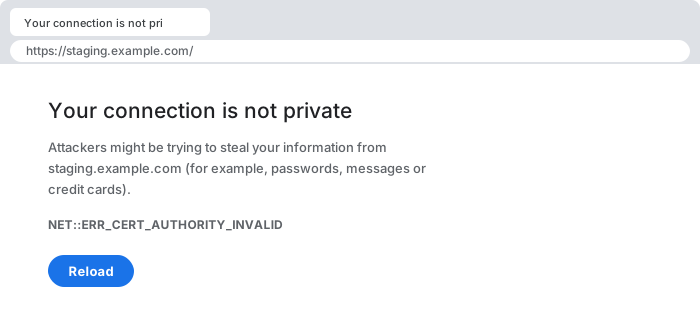
NET::ERR_CERT_AUTHORITY_INVALID in capitals, while the DevTools console logs the same failure lowercase as net::ERR_CERT_AUTHORITY_INVALID. Searching for one form and finding nothing is usually why.Click "Advanced" to see which specific check failed — Chrome and Firefox both name the exact problem underneath the generic warning: an untrusted issuer (this page), a hostname mismatch (the related CERT_COMMON_NAME_INVALID), or an expired certificate. They look similar to a user but have different root causes and different fixes.
30-second triage
- Your own local dev server (localhost, a custom local domain)? → Fix 1 (mkcert)
- Only happens on a work network or VPN, every site fails identically? → Fix 2 (corporate root CA)
- A public site you don't control is affected, for everyone? → Fix 3 (server-side chain issue)
- Failing inside a fetch()/API call, not a page load? → Fix 4 (diagnose from the command line)
Fix 1 — local development: use mkcert, don't click through
When: you're testing on localhost, 127.0.0.1, or a custom local hostname you control.
# macOS
brew install mkcert
mkcert -install                  # creates + trusts a local root CA, once per machine
mkcert localhost 127.0.0.1 ::1   # issues a cert for those names, signed by that root

# resulting files: localhost+2.pem / localhost+2-key.pem
# point your dev server's HTTPS config at these two files
A public certificate authority (Let's Encrypt, DigiCert, and the rest) can only issue a certificate for a domain you can prove you control via public DNS — there is no way to get a "real" publicly-trusted certificate for localhost, because localhost isn't a name anyone owns in public DNS. A self-signed certificate is cryptographically sound but chains to nothing the browser already trusts, which is exactly the gap this error reports. mkcert resolves this correctly: it creates its own private root CA, installs that root's public certificate into your OS and browser trust stores (a one-time, machine-local operation), and then issues leaf certificates signed by that root. Your browser now has a genuine, unbroken trust chain — it isn't bypassing the check, it's satisfying it for real.
Fix 2 — corporate network: install the organization's root CA
When: the error appears identically on every HTTPS site while connected to a specific network or VPN, and disappears off that network.
# confirm the issuer named in the certificate — click the padlock,
# view certificate, and look at the "Issued by" field. If it names
# your employer or a corporate security product instead of a known
# public CA, that confirms TLS inspection is the cause.

# fix: get the corporate root CA's .crt/.pem from IT and install it
# into your OS trust store (varies by OS):
#   macOS:   Keychain Access -> System -> import, set to "Always Trust"
#   Windows: certmgr.msc -> Trusted Root Certification Authorities -> Import
#   Linux:   copy to /usr/local/share/ca-certificates/, then update-ca-certificates
Many corporate networks and endpoint-security products run a TLS-inspecting (man-in-the-middle) proxy deliberately: it decrypts your HTTPS traffic, scans it for malware or data-loss-prevention policy violations, then re-encrypts it using a certificate signed by the organization's own private root CA before forwarding it to you. This is a legitimate, intentional architecture on managed corporate devices — the browser doesn't know the difference between "malicious interception" and "sanctioned corporate interception" except by whether it trusts the signing root, so a fresh laptop or a personal device that was never issued that trust simply fails the exact same way a real attack would look. Installing the correct corporate root (obtained from your IT department, never from a random download) is the correct, intended fix; it should already be pushed automatically on a properly managed company device via MDM, so seeing this manually is often a sign of an unenrolled or misconfigured machine.
Fix 3 — a public site is broken for everyone (server-side issue)
When: the affected site is one you don't operate, and the problem is reproducible from a different network/device, ruling out a local proxy.
# inspect the full chain from the command line — this reveals a
# missing or expired INTERMEDIATE certificate, the classic cause
# of "the leaf cert looks fine but the chain still fails":
openssl s_client -connect example.com:443 -showcerts </dev/null

# look for: "Verify return code: 20 (unable to get local issuer certificate)"
# or an expiry date on one of the intermediate certs in the printed chain
This is the case where the site operator, not the visitor, needs to act: a server can present a perfectly valid leaf certificate for its own domain while omitting or misconfiguring the intermediate certificate that links that leaf up to a root the browser trusts. Browsers cache intermediates they've seen before (which is why the same broken server sometimes "works" in one browser profile and not a fresh one), but a server is required to send its full intermediate chain on every connection — relying on client-side caching is not a substitute for correct server configuration. If you operate the affected server, the fix is to serve the complete certificate bundle (leaf + intermediates) exactly as your CA provided it, not just the leaf certificate alone.
Fix 4 — the failure is inside a fetch()/API call, not a page load
When: JavaScript code making a request to an HTTPS endpoint fails with a generic network error and no visible certificate warning page.
fetch("https://internal-api.example.com/data")
  .catch(err => console.error(err));
// TypeError: Failed to fetch
//   — no certificate detail is surfaced to JavaScript at all

// diagnose from a terminal instead, where the real reason is visible:
curl -v https://internal-api.example.com/data
# curl: (60) SSL certificate problem: unable to get local issuer certificate
There is no interactive "click to proceed" warning page for a background API request the way there is for top-level navigation — the browser simply refuses the connection and your JavaScript only ever sees a generic TypeError: Failed to fetch, with the actual certificate reason hidden from the page. Reproducing the same request with curl -v (or opening the API URL directly in a browser tab) surfaces the specific underlying reason, because those tools do print or render the certificate failure detail that a background fetch() call cannot.
Why this happens: how certificate trust actually works
The browser walks up the chain to a trusted root. A self-signed leaf, a missing intermediate, or an unknown root (a proxy) all break that walk.
TLS trust is a chain, not a single check: your browser ships with a curated list of root certificate authorities it trusts by default (Let's Encrypt, DigiCert, and a few dozen others, maintained by the OS or browser vendor). When a server presents its certificate, the browser has to walk from that certificate up through zero or more intermediate certificates until it reaches one of those trusted roots. ERR_CERT_AUTHORITY_INVALID means that walk failed to reach a trusted root anywhere along the way — whether because the leaf certificate is self-signed (there's no chain to walk at all), an intermediate is missing or expired (the chain breaks partway), or something is deliberately substituting a different, untrusted root into the chain (a proxy or an active attacker). The browser cannot distinguish "well-intentioned corporate proxy" from "malicious interception" by any means other than whether the presented root is one it already trusts — which is precisely why the fix is always about the trust store, never about "convincing" the browser the connection is fine some other way.
Common causes at a glance
| Situation | Root cause | Fix |
|---|---|---|
your own localhost dev server | self-signed certificate | mkcert, install its local root CA |
| every site fails, only on one network | corporate TLS-inspecting proxy | install the org's root CA |
| a public site is broken for everyone | missing/expired intermediate cert | server operator fixes the served chain |
fails in fetch(), generic error | same root causes, no detail surfaced to JS | reproduce with curl -v for the real reason |
| works in an old browser profile, not a new one | the old profile cached a missing intermediate | server should send the full chain regardless |
Debugging checklist
- ✓ Click "Advanced" to read the specific sub-error, not just the generic warning
- ✓ View the certificate's "Issued by" field — does it name a known public CA, or something else?
- ✓ Your own local server? Use
mkcert, don't click through - ✓ Fails on one network only? Suspect and install the corporate/proxy root CA
- ✓ A public site, broken for everyone? Run
openssl s_client -showcertsand check for a missing intermediate - ✓ Failing in a
fetch()call with no detail? Reproduce withcurl -vto see the real reason - ✓ Never click "Proceed anyway" on a connection you don't fully control
Frequently Asked Questions
What does net::ERR_CERT_AUTHORITY_INVALID mean?
The browser tried to build a chain of trust from the server's TLS certificate up to a root certificate authority it already trusts, and failed. Either the certificate is self-signed (issued by nobody the browser recognizes), the issuing CA's own root is missing from your device's trust store, or something is intercepting the connection and presenting its own certificate in place of the real one.
Why do I see this on my own local development server?
A local dev server almost always uses a self-signed certificate, because getting a certificate from a real public CA for localhost or a private hostname isn't possible — public CAs only issue certificates for domains you can prove you control via public DNS. Self-signed certificates are cryptographically valid but chain to nothing the browser trusts, which is exactly what this error reports.
Should I just click 'Proceed anyway' to get past this?
Only if you are certain you are the one who generated the certificate, and only on a connection you fully control, such as your own localhost. Clicking through on any other site — a coffee-shop Wi-Fi login, a work VPN, a link from an email — defeats the entire purpose of TLS and can expose you to a genuine machine-in-the-middle attack reading or altering your traffic.
How do I fix this properly for local development instead of clicking through?
Use mkcert to generate a locally-trusted certificate: it creates its own local certificate authority, installs that CA's root into your OS and browser trust stores, and then issues certificates signed by that CA for localhost or any hostname you choose. Your browser trusts the chain because it trusts the root mkcert installed — no warning, no clicking through, no security compromise.
Why does this happen on a corporate network but not at home?
Many corporate networks route HTTPS traffic through a TLS-inspecting proxy or antivirus product that decrypts, scans, and re-encrypts traffic using its own certificate, signed by a private corporate root CA. If that root CA isn't installed in your OS or browser trust store — common on a personal or newly-provisioned device — every HTTPS site behind that proxy fails this exact check, even though the sites themselves are perfectly fine.
Can an expired intermediate certificate cause this even on a legitimate public site?
Yes. A server's own certificate can be perfectly valid while the intermediate certificate that links it to a trusted root has expired or was revoked — the chain breaks in the middle, not at the leaf. This is a server misconfiguration, not something the visitor can fix; the site operator needs to update their certificate bundle to include a current intermediate.
Does this affect API requests the same way it affects loading a page?
Yes, and often more confusingly — a fetch() or XMLHttpRequest to a host with this certificate problem fails at the network layer with no response at all (surfacing as a generic network error in your JavaScript, not a helpful certificate message), because there is no interactive browser warning page for an API call the way there is for top-level navigation.
References
- Transport Layer Security (MDN)
- Let's Encrypt documentation (letsencrypt.org)
More network & security errors
Browse the full reference for network, CORS, and browser security errors — exact message, cause, and fix.