Quick answer
- Don't start restructuring for a circular import. The parenthetical is a guess, and it is often not your problem.
- Read the file path at the end of the message first. Is that the file you meant to import from?
- Not your file — you expected a library? You shadowed it. Rename your file.
- Your file, as intended? It is a real cycle — the usual fix is a deferred import.
- Path inside
site-packages? A broken install, not a cycle. - Python 3.13+ changed the wording for flat projects — see the version matrix before trusting the hint.
The exact error string
Traceback (most recent call last):
  File "/app/orders.py", line 1, in <module>
    from customers import Customer
  File "/app/customers.py", line 1, in <module>
    from orders import Order
ImportError: cannot import name 'Order' from partially initialized module 'orders' (most likely due to a circular import) (/app/orders.py)

# Python 3.13+ replaces the hint in flat projects — same code, same cycle:
ImportError: cannot import name 'Order' from 'orders' (consider renaming '/app/orders.py' if it has the same name as a library you intended to import)

# the stdlib-collision wording, which names the module it clashes with:
ImportError: cannot import name 'randint' from 'random' (consider renaming '/app/random.py' since it has the same name as the standard library module named 'random' and prevents importing that standard library module)

# the AttributeError siblings — same cause, raised by attribute access rather than by "from ... import"
AttributeError: partially initialized module 'customers' has no attribute 'RATE' (most likely due to a circular import)
AttributeError: cannot access submodule 'models' of module 'pkg' (most likely due to a circular import)

# Python 3.7 and earlier gave no hint at all:
ImportError: cannot import name 'Order' from 'orders' (/app/orders.py)
Python raises this when you ask a module for a name it has not defined yet. The module is mid-flight: Python has started executing its top-level code and has not reached the line that creates the name you want. Nothing is misspelled and nothing is missing from disk — the request simply arrived too early.
The important part is what the message does not know. Python observes one fact — the module was still initializing — and then guesses at the reason. That guess can be wrong, because several unrelated situations leave a module partially initialized.
Everything below was verified by running it: CPython 3.14.6 locally, plus 3.7, 3.8, 3.12 and 3.13 in containers, and Pydantic 2.13.5.
Start here: read the path, not the hint
The message ends with a file path in parentheses. That path is a fact, while the hint before it is a guess, so the fastest route to the right fix is to ask one question about it: is that the file you meant to import from?
One path, one traceback question. This beats reading the parenthetical, which is right only some of the time.
Anatomy of the message
The message carries five pieces of information, and only the first four are facts:
cannot import name 'Order' → the attribute lookup that failed
partially initialized module → that module started running and has not finished
module 'orders' → which module was asked for the name
(/app/orders.py) → the file that module resolved to — read this one first
(most likely due to a circular import) → a guess at the reason, not an observation
If you wrote from flask import Flask and the path says /app/flask.py, you have your answer and no amount of restructuring will help. If you wrote from orders import Order and the path is your own orders.py, exactly as intended, then you are looking at a real cycle.
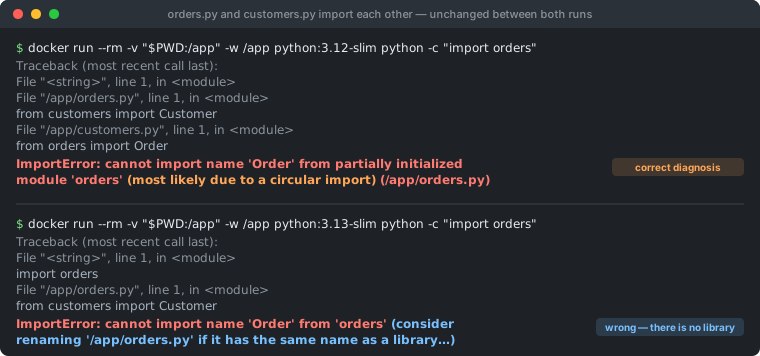
orders.py → customers.py, but on 3.13 the words “circular import” have vanished and been replaced by advice to rename a file that collides with nothing.The three situations that produce this message
Everything on this page hangs off these three. The fixes differ completely, which is why identifying the situation first matters more than any individual fix.
| Situation | What is actually happening | Where to go |
|---|---|---|
| 1. Circular import | Two of your modules each need the other's contents while still executing | Fixes 1–5 |
| 2. Shadowing | Your file has the same name as a library, so Python imports yours instead | Rename the file |
| 3. Broken install | A package's compiled extension is missing or built for another Python | Reinstall |
Situations 2 and 3 involve no cycle at all, yet on Python 3.12 and earlier both are reported as “most likely due to a circular import.”
The hint changed in 3.8 and flipped in 3.13
CPython has revised this message twice. Python 3.8 added the circular-import hint (3.7 had none). Python 3.13 then added a shadowing suggestion that replaces it under specific conditions — with the result that a genuine cycle in a flat project is now reported as a possible filename collision.
This is a known and deliberate outcome: it was reported to CPython as issue gh-136094, describing exactly this scenario on 3.13.5 versus 3.12.6, and closed as not planned. The behaviour is staying, so it is worth learning rather than waiting out.
| What is actually wrong | Python 3.8 – 3.12 says | Python 3.13+ says |
|---|---|---|
Real cycle, flat layout (orders.py ↔ customers.py, run from their own directory) |
circular import — correct | consider renaming — misleading |
Real cycle, package submodules (pkg.models ↔ pkg.services) |
circular import — correct | circular import — correct |
Real cycle, top-level modules imported from elsewhere (python -m, installed script, test runner) |
circular import — correct | circular import — correct |
Your flask.py shadows the installed Flask |
circular import — misleading | consider renaming — correct |
Your random.py shadows the standard library |
circular import — misleading | renaming, and it names the module — correct |
| Package's compiled extension failed to build | circular import — misleading | consider renaming — misleading |
Exactly when the 3.13 renaming hint appears
It is not simply “top-level modules.” Two conditions must both hold, which is why the third row above keeps the old wording:
| Module name has no dot | Its file was found in sys.path[0] | Python 3.13+ shows |
|---|---|---|
| yes | yes | consider renaming |
| yes | no | most likely due to a circular import |
no (e.g. pkg.models) | yes | most likely due to a circular import |
| no | no | most likely due to a circular import |
sys.path[0] is the directory of the script you ran (or the current directory for python -c). CPython checks it because that is the only place a file of yours can outrank an installed package — so the suggestion is only ever offered where shadowing is possible, not where it has been observed. The dotted-name exclusion mostly falls out of the same logic: a submodule lives one directory down, and a dotted name cannot shadow a top-level library anyway.
The practical consequence: the same cycle can produce different messages depending on how you launch it. Running python orders.py from its own folder gives the renaming hint; running the same code through python -m, an installed console script, or pytest with a different rootdir gives the circular-import hint. If your message and a colleague's disagree, this is why — neither install is broken.
There is also one genuinely reliable signal inside the 3.13+ wording, and it is a single word:
# CONFIRMED collision — "since", and it names the module you are colliding with:
(consider renaming '/app/random.py' since it has the same name as the standard library
 module named 'random' and prevents importing that standard library module)

# UNCONFIRMED guess — "if", and it names nothing:
(consider renaming '/app/orders.py' if it has the same name as a library you intended to import)
CPython uses the definite since form only when it has actually matched your filename against a standard-library module name. The conditional if form means it checked nothing — which is what a real circular import produces, and also a shadowed third-party package like Flask. So since is a diagnosis; if is a prompt to go and look.
Why a module is ever “partially initialized”
Python inserts a module into sys.modules before it runs the module body, not after. That ordering is deliberate: it is what stops two mutually importing modules from recursing forever. The cost is that a half-built module is visible and importable, and its namespace fills in one statement at a time as the body executes.
The cycle is not detected and rejected — it is allowed, and then fails on an attribute that has not been created yet.
Because each module runs only once, each file appears as exactly one frame in the traceback. That is worth stating plainly, because it makes a popular diagnostic wrong — see the double-execution trap below.
This is also why the fix is so often about timing rather than architecture. The two modules genuinely can depend on each other; they just cannot both need the other's contents at import time.
Situation 1 — a genuine circular import
Five fixes follow, ordered by how little they disturb your design. They are variations on one idea: stop needing the other module's contents while your own module is still executing.
Fix 1 — read the traceback to find the actual cycle
Before changing anything, name the loop. Read the traceback top-down and write down each file as it appears. The cycle runs from the frame for the module named in the error, down to the frame that tried to import from it.
# shown with the Python 3.8–3.12 wording; on 3.13+ this same run ends with
# "(consider renaming '/app/orders.py' …)" instead — the frames are identical either way

Traceback (most recent call last):
  File "/app/main.py", line 1, in <module>
    import orders                      #  entry point, not part of the cycle
  File "/app/orders.py", line 1, in <module>    ← 'orders' starts here and never finishes
    from customers import Customer
  File "/app/customers.py", line 1, in <module>
    from orders import Order           ← asks the unfinished 'orders' for a name
ImportError: cannot import name 'Order' from partially initialized module 'orders'
The test that works: the module named in the error also appears as an earlier, still-executing frame. Above, the error names orders and there is an orders.py frame higher up — that is the cycle. In a shadowing case the named module is the frame you are already in (the file imports itself), and in a broken install the frame sits in site-packages.
One practical note: the topmost frames are your entry point and usually irrelevant — do not start editing there. And the module named in the error is simply the target of the failing from ... import; in a three-module cycle the best edge to cut is often a different one entirely.
Fix 2 — import the module, not the name
This is the smallest change that fixes a genuine cycle. from orders import Order must read an attribute immediately. Plain import orders only binds the module object, which already exists in sys.modules even while half-built — so the attribute lookup can happen later.
# ❌ fails — needs Order to exist right now
# from orders import Order
#
# class Customer:
#     def new_order(self):
#         return Order(self)

# ✅ works — binds the module now, reads the attribute later
import orders

class Customer:
    def new_order(self):
        return orders.Order(self)      # looked up at call time, not import time
The qualification that matters: this only works when the name is needed at runtime rather than during module initialization. Swapping the import form is not enough on its own — if your module-level code still needs Order (to subclass it, to build a registry dict, as a default argument), the cycle is unchanged and you get the same failure, this time as AttributeError: partially initialized module 'orders' has no attribute 'Order'. The import form and the use site have to move together.
Verified on CPython 3.14.6: written this way, both import orders and import customers succeed from either entry point. That AttributeError is worth distinguishing from the far more common AttributeError: 'NoneType' object has no attribute 'X', which looks similar in a log but means something entirely different.
Fix 3 — move the import into the function that uses it
When you need the name itself rather than the module, push the import down to the point of use. Function bodies do not run at import time, so the import happens on first call, when everything is loaded.
# pkg/models.py
class User:
    def notify(self):
        from pkg.services import send     # runs on first call, not at import
        return send(self.__class__.__name__)
Verified from both entry points — import pkg.models and import pkg.services — which is the property that matters and the one the popular “move it to the bottom” advice lacks (see below). Costs: the import runs on every call (cheap after the first, since sys.modules caches it), it is invisible to tools that scan top-level imports, and it can hide a design problem. If you find yourself doing this in a dozen places, those two modules probably want to be one module, or want a third one between them.
Fix 4 — type-only imports don't need to exist at runtime
A large share of real cycles are created by imports that exist purely to annotate a signature. TYPE_CHECKING is False at runtime, so the import disappears from execution while type checkers still see it.
# pkg/models.py
from __future__ import annotations       # not needed on Python 3.14+ (PEP 649)
from typing import TYPE_CHECKING

if TYPE_CHECKING:                        # False at runtime — no import happens
    from pkg.services import Notifier


class User:
    def notify_with(self, n: Notifier) -> str:
        return n.send(self.name)
Version note: on Python 3.13 and earlier the from __future__ import annotations line is required, or the bare Notifier annotation is evaluated at class-creation time and raises NameError. On Python 3.14+, PEP 649 evaluates annotations lazily by default, so the future import is no longer needed — verified on 3.14.6, where the class above imports cleanly without it.
Know the trade. The name genuinely does not exist at runtime, so anything that resolves annotations will fail. On 3.14.6, typing.get_type_hints() on that method raises NameError: name 'Notifier' is not defined even though calling the method works fine. (3.14 also adds annotationlib, whose Format.FORWARDREF returns ForwardRef('Notifier') instead of raising — useful for tools that must introspect without importing.)
That matters most with Pydantic, FastAPI and several ORMs, which read annotations at runtime by design. On Pydantic 2.13.5 the pattern above raises:
pydantic.errors.PydanticUserError: `User` is not fully defined; you should define
`Invoice`, then call `User.model_rebuild()`.
Follow the message literally and it is not quite enough: calling User.model_rebuild() from another module raises PydanticUndefinedAnnotation: name 'Invoice' is not defined, because the name has to be resolvable in the module that defines the model. Do the real import there, after the class body, and then rebuild:
# pkg/models.py — bottom of the file, after class User is defined
from services import Invoice     # safe here: User already exists, so the cycle closes
User.model_rebuild()             # public API, no private keyword arguments
Both forms were verified on Pydantic 2.13.5. If you cannot put the import there, the other public option is to bind the name onto the defining module before rebuilding — models.Invoice = services.Invoice then models.User.model_rebuild(). Avoid the _types_namespace= keyword you may find suggested elsewhere; the leading underscore marks it private and unstable.
Fix 5 — __init__.py re-export order
This one catches well-structured projects, and the message blames the package rather than the submodule that caused it. A package's __init__.py re-exports its submodules for convenience; a submodule then imports a sibling through the package:
# shop/__init__.py
from shop.order import Order          # runs first…
from shop.customer import Customer    # …so this line has not run yet

# shop/order.py
from shop import Customer             # ← asks the package for a name it hasn't bound

# ImportError: cannot import name 'Customer' from 'shop'
#   (consider renaming '.../shop/__init__.py' if it has the same name as a library…)
Note where the path points: shop/__init__.py, not order.py. Two fixes, both verified:
# FIX A — reorder __init__.py so leaf modules are imported first
from shop.customer import Customer    # no dependencies
from shop.order import Order          # depends on customer

# FIX B (preferred) — inside the package, import the submodule directly
# shop/order.py
from shop.customer import Customer    # bypasses the half-built package namespace
Fix B is the more durable: Fix A works until someone adds an import and reorders the file. As a rule, a package's own submodules should import from each other by their real paths and leave the __init__.py re-exports for external callers.
Framework-specific forms of the same cycle
Three ecosystems have a canonical answer that is better than any generic fix, because each gives you a way to refer to a class without importing it:
# Django — refer to models by string, never by import, across apps
class Order(models.Model):
    customer = models.ForeignKey("customers.Customer", on_delete=models.CASCADE)
# and in apps.py, import signal handlers inside ready(), not at module level:
class ShopConfig(AppConfig):
    def ready(self):
        from . import signals          # deferred — the app registry is populated by now

# SQLAlchemy — relationships take a string; the mapper resolves it later
class Order(Base):
    customer = relationship("Customer", back_populates="orders")

# Flask — the app-factory pattern exists to break the app ↔ views cycle
def create_app():
    app = Flask(__name__)
    from .views import bp             # imported inside the factory, after app exists
    app.register_blueprint(bp)
    return app
In each case the framework is doing the same thing this page recommends: deferring the moment the name has to be resolved until after every module has finished loading.
Situation 2 — your file is shadowing the library
Questions of this shape attract very heavy traffic on Stack Overflow — cannot import name 'Flask' from partially initialized module 'flask' and its equivalents for openai, dash and matplotlib have tens of thousands of views each, frequently with no accepted answer — and on Python 3.12 and earlier the message actively points away from the cause. Save a script as flask.py, and from flask import Flask finds your file instead of the installed package, because the script's own directory comes first on sys.path:
# flask.py  ← this file IS the problem
from flask import Flask
app = Flask(__name__)

# Python 3.12:  cannot import name 'Flask' from partially initialized module 'flask'
#               (most likely due to a circular import) (/app/flask.py)
# Python 3.13+: cannot import name 'Flask' from 'flask'
#               (consider renaming '/app/flask.py' …)
Both are, strictly, accurate: the module is partially initialized, and it is importing itself, so 3.12 calling it a circular import is not a lie — it is just useless. There is no cycle to break and no code to restructure. Rename the file.
# confirm it before renaming — is there a file next to your script with that name?
python -c "import pathlib; n='flask'; print([str(p) for p in pathlib.Path('.').glob(n+'.py')] + [str(p) for p in pathlib.Path('.').glob(n+'/__init__.py')])"

# then rename it
mv flask.py my_app.py
You do not need to clear __pycache__. A cached __pycache__/flask.cpython-314.pyc becomes unimportable the moment flask.py is gone, because Python 3 only uses cached bytecode alongside its source — verified on 3.14.6. The one case that does linger is a stray top-level flask.pyc sitting where the source used to be, which is a valid sourceless module and will still shadow. That is rare, but if you have one, delete it:
ls flask.pyc 2>/dev/null && rm flask.pyc # only the top-level one shadows; __pycache__ does notThe names that bite most often in real reports are flask.py, openai.py, dash.py, random.py, email.py, json.py, select.py and types.py.
One caveat: shadowing does not always surface as this error. A local email.py shadowing the standard library gives ModuleNotFoundError: No module named 'email.message'; 'email' is not a package instead — different message, same root cause. If you are chasing that one, our ModuleNotFoundError: No module named 'X' reference covers the shadowing and sys.path triage in more depth.
Situation 3 — a broken or half-built install
The third situation has no cycle and no shadowing anywhere. A package's __init__.py imports its own compiled extension module, the extension is missing or was built against a different Python, and the import fails while the package is initializing — which is enough to trigger the same hint:
# somepkg/__init__.py  (inside site-packages, not your code)
from . import _speedups

# Python 3.12:  cannot import name '_speedups' from partially initialized module 'somepkg'
#               (most likely due to a circular import) (…/somepkg/__init__.py)
# Python 3.13+: cannot import name '_speedups' from 'somepkg' (consider renaming …)
Here both hints are misleading. The tells are that the failing frame is inside site-packages rather than your project, and that the missing name looks like a C extension — a leading underscore, or a name like ft2font. Real examples that generate steady search traffic: _gi from gi, ft2font from matplotlib, _cffi_backend.
# reinstall without the wheel cache, which may be holding the bad build
python -m pip install --force-reinstall --no-cache-dir somepkg

# check you're not looking at two installs of the same package
python -c "import somepkg; print(somepkg.__file__)"
python -m pip show somepkg
If the package was built for a different interpreter — common after a Python upgrade, or when pip and python disagree — the underlying problem is the environment rather than the package. Use python -m pip rather than bare pip so the install always lands in the interpreter you are actually running. If that reinstall is itself refused, you have walked into error: externally-managed-environment, which is the distribution telling you to use a virtual environment first.
The double-execution trap
A widely repeated diagnostic says a circular import shows “the same file twice in the traceback.” It does not. Python executes each module exactly once, so in a normal cycle every file appears as exactly one frame — what looks like a second occurrence is the text of an import statement inside another file, not a frame of its own.
A file really does appear as two frames in one specific case, and it is a distinct bug worth recognising: running a module directly while it is also imported by name. Then __main__ and orders are two separate module objects built from the same file, and the file is executed twice:
$ python orders.py                       # NOT "python main.py"   — captured on CPython 3.14.6

Traceback (most recent call last):
  File "/app/orders.py", line 1, in <module>      ← running as __main__
    from customers import Customer
  File "/app/customers.py", line 1, in <module>
    from orders import Order
  File "/app/orders.py", line 1, in <module>      ← genuinely a SECOND frame, as 'orders'
    from customers import Customer
ImportError: cannot import name 'Customer' from 'customers' (consider renaming '/app/customers.py' if it has the same name as a library you intended to import)
Note the error now names customers, not orders — the failure moved. Two frames for one file means your module-level code, class definitions and singletons all exist twice under two names, which causes problems far beyond this import error (isinstance checks failing against a seemingly identical class is the classic symptom). Run a launcher or python -m package.module instead of executing a module that is also imported.
Finding every cycle in your project
Once you have fixed one, it is worth learning whether there are others, since a cycle only surfaces when a particular import order hits it:
# see the real import order and what each import costs (stdlib, no install)
python -X importtime -c "import yourpkg" 2>&1 | tail -40

# static detection across the whole project
pip install pylint && pylint --disable=all --enable=cyclic-import yourpkg

# enforce a layering contract in CI so new cycles can't be merged
pip install import-linter # configure contracts in .importlinterpylint's cyclic-import check is the quickest one-off; import-linter is the one to adopt if the codebase has layers you want to keep apart permanently.
Two popular fixes that do not work
These two appear in most of the top-ranking write-ups for this error. Both were tested on CPython 3.14.6; neither survives.
“Move the import to the bottom of the file”
It appears to work, and that is the problem. Moving the import below your definitions only decides which of the two modules survives being imported first. The cycle is untouched:
# pkg/models.py
class User:
    pass

from pkg.services import send        # "fixed" by moving it down here

# $ python -c "import pkg.models"     → OK
# $ python -c "import pkg.services"   → ImportError: cannot import name 'send'
#                                       from partially initialized module 'pkg.services'
Same code, two entry points, two outcomes. It holds until a test module, a CLI script, a Celery worker or a different framework import order touches the other module first — at which point it fails somewhere unrelated to the change that caused it. Fix 3 works from every entry point; prefer it. (The Pydantic case in Fix 4 is the narrow exception where a bottom-of-file import is correct, because there the import exists to resolve an annotation after the class is defined, not to be used during initialization.)
“Use importlib.import_module instead”
At module level this does nothing at all. importlib.import_module performs the same import at the same moment as an import statement — it is the machinery the statement itself calls:
# pkg/models.py
import importlib
services = importlib.import_module("pkg.services")   # identical timing, identical failure

# ImportError: cannot import name 'User' from partially initialized module 'pkg.models'
importlib only helps when the call is deferred into a function — and a plain import statement inside that same function does the identical job with less ceremony. Keep importlib for what it is actually for: importing a module whose name you do not know until runtime, such as a plugin loaded from config.
Debugging checklist
- ✓ Read the path in the parentheses — is that the file you meant to import from?
- ✓ Check whether the module named in the error has an earlier, still-running frame; that, not the hint, indicates a cycle
- ✓ One file as two frames means double execution, a different bug
- ✓ On 3.13+, check since vs if — only since is a confirmed name collision
- ✓ Message differs from a colleague's? Compare how you each launch it —
sys.path[0]changes the hint - ✓ Missing name starts with
_or the frame is insite-packages? Suspect a broken build - ✓ Moving to
import modulealone is not enough — the use site must move into a function too - ✓ Test both entry points after any fix — import each module of the pair first
- ✓ Annotation-only import? Put it under
TYPE_CHECKING— and check nothing resolves hints at runtime - ✓ Inside a package, import siblings by their real path, not via the package's
__init__.py
Frequently Asked Questions
What does partially initialized module actually mean?
It means Python has started running that module's top-level code but has not finished. Python registers a module in sys.modules before executing its body, precisely so that a second import of the same module returns the half-built object instead of looping forever. If your import of a name happens while the module is still on its way down its own file, the name simply has not been assigned yet, and you get this ImportError. The module is not broken and the name is not misspelled — you asked too early.
Is the circular import hint always right?
No. The hint is a guess derived from a single condition — the module was still initializing — and several unrelated situations satisfy that condition. A genuine import cycle is one. A local file that shadows an installed library is another; questions of that kind attract very heavy traffic on Stack Overflow, where cannot import name 'Flask' from partially initialized module 'flask' usually turns out to be a script saved as flask.py. A package whose compiled extension failed to build is a third. Check the file path in the message rather than trusting the parenthetical.
Why does Python 3.13 tell me to rename my file instead of mentioning a circular import?
Python 3.13 added a shadowing suggestion that replaces the circular-import hint when two conditions both hold: the failing module name has no dot in it, and its file was found in the directory Python placed at sys.path[0], which is your script's own directory. A plain two-module cycle in a flat project meets both, so it now reports “consider renaming …” and never mentions circular imports. This was reported to CPython as issue gh-136094 and closed as not planned, so the behaviour is staying. If either condition fails — a dotted submodule, or modules imported from somewhere other than the script directory such as python -m or a test runner — you still get the original circular-import wording.
How do I tell a circular import apart from a shadowed library?
Read the file path printed at the end of the message and ask whether that is the file you meant to import from. In a real cycle it is your own module and you expected your own module. In a shadowing case it is your own file where you expected site-packages, which is the whole problem. A second tell on Python 3.13 and later is a single word: “since it has the same name as the standard library module named X” is a confirmed collision, while “if it has the same name as a library you intended to import” is only a guess and is what a genuine cycle also produces.
Does the same file appearing twice in the traceback prove a circular import?
No, and this is a common misreading. During a normal circular import each module is executed only once, so each file appears as exactly one frame; what looks like a second occurrence is usually the text of an import statement inside another file, not a separate frame. The reliable test is different: the module named in the error also appears as an earlier, still-executing frame in the traceback. A file genuinely appearing as two frames means something else — you ran a module directly as a script while it is also imported by name, so Python built both __main__ and the named module from the same file and executed it twice.
Does moving the import to the bottom of the file fix a circular import?
Not reliably, and it is one of the most commonly repeated bad fixes. Moving the import below your class and function definitions only decides which of the two modules survives being imported first. Import the other module first — from a test, a script, or a different entry point — and the same error comes back. Tested on CPython 3.14.6, the identical code imports cleanly via one module and fails via the other. Defer the import into the function that uses it instead, which works from every entry point.
Does importlib.import_module avoid a circular import?
Not when you call it at module level, which is how it is usually shown. importlib.import_module performs exactly the same import at exactly the same moment as an import statement, so the cycle is untouched and the error is identical. It only helps when the call itself is deferred to runtime, inside a function — and at that point a plain import statement inside the function does the same job and is easier to read. Reach for importlib when the module name is genuinely dynamic, not to break a cycle.
Why does import module work when from module import name fails?
Because the two forms need different things at different times. from module import name has to read an attribute off the module object immediately, and that attribute does not exist yet. Plain import module only binds the module object itself, which already exists in sys.modules, so it succeeds even mid-cycle. The catch is that you must also defer the attribute lookup: reading module.Name at the top level of your file fails exactly as before, because the name still is not there. It works when the lookup happens inside a function body, which runs after both modules have finished.
Can type annotations cause this error, and does TYPE_CHECKING fix it?
Yes. An import that exists only to annotate a parameter or return value is still a real runtime import and can close a cycle on its own. Putting it under if TYPE_CHECKING: removes it at runtime while type checkers still see it. On Python 3.13 and earlier you also need from __future__ import annotations; on 3.14 and later PEP 649 evaluates annotations lazily by default, so the future import is no longer required. Be aware of the trade: the name does not exist at runtime, so anything resolving annotations — typing.get_type_hints, Pydantic, FastAPI, some ORMs — will fail unless you make the name available again before it is resolved.
References
- The import system — the module cache (Python Language Reference)
- The
importstatement (Python Language Reference) - typing.TYPE_CHECKING (Python Standard Library)
- PEP 649 — Deferred Evaluation of Annotations Using Descriptors (Python Enhancement Proposals)
- sys.path (Python Standard Library)
Staring at a traceback you can't place?
Paste it into the Error Log Analyzer and it will match the message against this reference library, including the sibling import errors this one is easy to confuse with.