Quick answer
Cannot find module means Node could not resolve a require() or import. A bare name like 'express' usually means you forgot npm install; a path like './utils' means the file is missing, mis-cased, or (in ESM) needs a .js extension.
The exact error string
A typical CommonJS failure prints the missing module, a require stack, and the error code:
Error: Cannot find module 'express'
Require stack:
- /app/src/server.js
- /app/index.js
    at Function.Module._resolveFilename (node:internal/modules/cjs/loader:1145:15)
    at Function.Module._load (node:internal/modules/cjs/loader:986:27)
    at Module.require (node:internal/modules/cjs/loader:1233:19)
    at require (node:internal/modules/helpers:179:18)
    at Object.<anonymous> (/app/src/server.js:2:17) {
  code: 'MODULE_NOT_FOUND',
  requireStack: [ '/app/src/server.js', '/app/index.js' ]
}
What it actually looks like
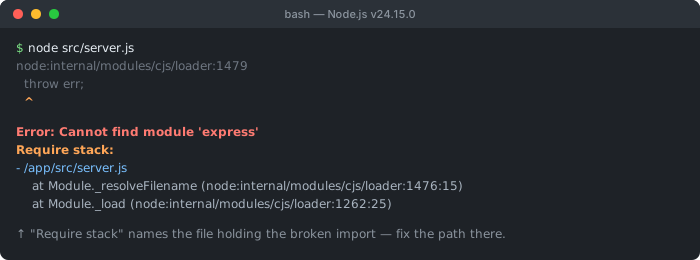
Require stack is the part to read first: its top entry is the file whose require() failed, so that is the file to fix — not wherever the stack frames happen to point inside Node's internals.The ES module variant looks slightly different and carries a different code:
node:internal/process/esm_loader:97
Error [ERR_MODULE_NOT_FOUND]: Cannot find module
'/app/src/utils' imported from /app/src/server.js
Did you mean to import ./utils.js?
    at finalizeResolution (node:internal/modules/esm/resolve:264:11) {
  code: 'ERR_MODULE_NOT_FOUND'
}
How to read the require stack
The require stack is the most useful part of the message, and most people skim past it. It lists the chain of files Node followed to reach the failed import, with the file that actually called require() at the top. Read it top-down: the first entry is the file containing the broken statement.
In the example above, /app/src/server.js is at the top — so line 2 of server.js is where express is required and where the problem lives. You do not need to inspect index.js; it merely loaded server.js. Jumping straight to the top frame saves you from guessing which file is at fault.
Is it a package or a local file?
Before fixing anything, classify the missing module — the two cases have completely different solutions:
- Bare specifier (
'express','lodash','@scope/pkg') — Node looks innode_modules. A failure almost always means the package is not installed. - Relative path (
'./utils','../config/db') — Node looks at that exact location on disk. A failure means the file does not exist where you pointed, the name is mis-cased, or the extension is missing.
Fix: missing npm package
If the missing module is a package name, install it. After cloning a repository, node_modules is not included (it is gitignored), so every dependency is missing until you install:
# Install everything listed in package.json
npm install

# If a specific package was never added to package.json, add it
npm install express

# Confirm it is actually there
ls node_modules/express
npm ls express
If npm install runs but the package is still missing, it was never saved to package.json — someone installed it locally without --save long ago, or the dependency line was removed. Installing it explicitly fixes both the import and the manifest so the next person who clones the repo gets it too.
Fix: wrong local path or filename
For a relative import, the file simply is not where Node resolved it. Check three things in order: the path, the casing, and the extension. Casing is the sneaky one — require('./Utils') works on macOS and Windows (case-insensitive filesystems) but throws Cannot find module on Linux, which is why builds pass locally and fail in Docker or CI.
// File on disk:  src/userService.js

const svc = require('./userservice');   // ❌ wrong case — fails on Linux
const svc = require('./userService');   // ✅ matches the file exactly

const cfg = require('../config/db');    // resolves ../config/db.js (CommonJS)
const cfg = require('config/db');       // ❌ no ./ — Node treats it as a package
Note the last line: forgetting the leading ./ makes Node treat config/db as a package in node_modules, not a local file. Always prefix local imports with ./ or ../.
Fix: ESM imports need the file extension
In ES modules — a project with "type": "module" in package.json, or a .mjs file — relative imports must include the file extension. The ESM resolver does not guess .js for you and does not fall back to an index.js the way CommonJS require() does:
// In an ES module ("type": "module")
import { parse } from './utils';      // ❌ ERR_MODULE_NOT_FOUND
import { parse } from './utils.js';   // ✅ extension is required

import db from './config';            // ❌ no automatic index resolution
import db from './config/index.js';   // ✅ point at the file explicitly

// TypeScript + ESM ("module": "NodeNext"): write .js even from a .ts file
import { something } from './utils';     // ❌ even in a .ts file
import { something } from './utils.js';  // ✅ .js refers to the COMPILED output
If you are migrating a CommonJS codebase to ESM, this is the single most common breakage. The TypeScript twist trips up almost everyone: with "module": "NodeNext" you write ./utils.js in the source even though the file on disk is utils.ts, because the import specifier points at the emitted JavaScript, not the source file.
For dynamic resolution, modern Node offers cleaner tools than guessing paths: import.meta.resolve('./utils.js') returns the fully resolved URL of a specifier from inside an ES module, and createRequire(import.meta.url) from the built-in node:module lets you use CommonJS-style require() (including its index/extension fallbacks) within an ESM file when you genuinely need it.
// Resolve a specifier without importing it (Node 20.6+ stable)
const url = import.meta.resolve('./utils.js');

// Bridge to CommonJS resolution from inside an ES module
import { createRequire } from 'node:module';
const require = createRequire(import.meta.url);
const cfg = require('./config'); // CJS-style fallback (tries .js, index.js)
Fix: a package's exports map blocks the deep import
If the package is clearly installed but Node still reports Cannot find module '@scope/pkg/internal/thing' (or ERR_PACKAGE_PATH_NOT_EXPORTED), the cause is the package's exports field in its own package.json. Since Node 12+, an exports map acts as an allow-list: only the subpaths it explicitly declares can be imported, and reaching into any other internal file is blocked — even though the file physically exists in node_modules.
// The dependency's package.json exposes only these entry points:
{
  "name": "@scope/pkg",
  "exports": {
    ".": "./dist/index.js",
    "./helpers": "./dist/helpers.js"
  }
}

import x from '@scope/pkg';            // ✅ matches "."
import h from '@scope/pkg/helpers';    // ✅ matches "./helpers"
import y from '@scope/pkg/dist/util';  // ❌ not exported — Cannot find module
The fix is to import only the documented public entry points — check the package's README or its exports map for what is actually exposed. Deep paths that worked years ago often break after a package adds an exports field; that is intentional encapsulation, not a bug. If you truly need an internal file, open an issue asking the maintainer to export it rather than relying on a path that may vanish in the next release.
Other common causes
- Package in
devDependencies, production install skipped it —npm ci --omit=devorNODE_ENV=productionwill not install dev packages. Move anything required at runtime intodependencies. - Corrupted or partial
node_modules— an interrupted install can leave gaps. Deletenode_modulesandpackage-lock.json, then reinstall clean. - Monorepo / workspace hoisting — the package resolves from the workspace root, not the sub-package. Confirm the dependency is declared in the workspace that uses it.
- Built output references a missing file — a bundler or
tscoutput points at a path that was not emitted. Rebuild and check thedistfolder. - Wrong working directory — running the script from a different folder changes how relative paths resolve. Run from the project root or use absolute paths.
Debugging checklist
- ✓ Read the top of the Require stack — that file contains the broken import
- ✓ Decide if the module is a package (bare name) or a local file (starts with
./or../) - ✓ Package missing? Run
npm install, ornpm install <name>if it was never inpackage.json - ✓ Local file? Verify the path, match the filename casing exactly (Linux is case-sensitive)
- ✓ Using ES modules? Add the
.jsextension to relative imports - ✓ Fails only in production/CI? Check
devDependenciesvsdependenciesand case sensitivity - ✓ Still broken? Delete
node_modules+ lockfile and reinstall from clean
Frequently Asked Questions
What does Error: Cannot find module mean in Node.js?
It means Node's module resolver could not locate the package or file you asked for with require() or import. For a bare name like 'express' it usually means the package is not installed in node_modules. For a path like './utils' it means the file does not exist at that resolved location. The error code is MODULE_NOT_FOUND (CommonJS) or ERR_MODULE_NOT_FOUND (ES modules).
How do I read the require stack in the error?
The Require stack lists the chain of files that led to the failed import, with the file that actually called require() at the top. Read it top-down: the first entry is the file containing the broken require or import statement, so that is where you fix the path or add the dependency. The rest of the stack shows how Node reached that file.
Why does it work on my machine but fail in Docker or CI?
Two common reasons. First, the package may be in devDependencies but the production install used --omit=dev (or NODE_ENV=production), so it was never installed. Second, Linux filesystems are case-sensitive while macOS and Windows are not — require('./Utils') resolves to ./utils locally but fails on Linux. Match the exact filename casing and confirm the dependency is in the right section of package.json.
Why do I get Cannot find module with an ES module import?
In ES modules (type: module or .mjs files), relative imports must include the file extension. import './utils' fails with ERR_MODULE_NOT_FOUND; you must write import './utils.js'. Unlike CommonJS require(), the ESM resolver does not automatically try adding .js or resolving an index file, so the extension is mandatory.
How do I fix Cannot find module after cloning a repository?
Run npm install. A freshly cloned repo does not include node_modules (it is gitignored), so every dependency reports as missing until you install. If a specific package is still missing after install, it was probably never added to package.json — install it explicitly with npm install <package> so it is saved as a dependency.
What is the difference between MODULE_NOT_FOUND and ERR_MODULE_NOT_FOUND?
MODULE_NOT_FOUND is thrown by the CommonJS loader when require() cannot resolve a module. ERR_MODULE_NOT_FOUND is the ES module equivalent, thrown when an import specifier cannot be resolved. They mean the same thing — a module was not found — but the ESM version is stricter about file extensions and does not fall back to index files.
References
- MODULE_NOT_FOUND (Node.js docs)
- CommonJS modules (Node.js docs)
Working with a JSON API?
Format and validate any JSON response in your browser — nothing is uploaded to a server.