Quick answer
TypeScript's module resolver found nothing for that import — not the module, not a .d.ts, not an @types package. Work down the real causes in order:
- Package not installed
- Installed, but untyped — no matching
@types - A wrong or case-mismatched local path
- A
tsconfigpath alias not mirrored in your bundler - A
moduleResolutionmismatch against a package'sexportsmap
Quick fix flowchart
Follow the first branch that matches your import, then jump to that numbered fix below.
The exact error string
import { formatDate } from "fancy-date-lib";
// error TS2307: Cannot find module 'fancy-date-lib' or its corresponding type declarations.

import { helper } from "./Utils";
// error TS2307: Cannot find module './Utils' or its corresponding type declarations.
What it actually looks like
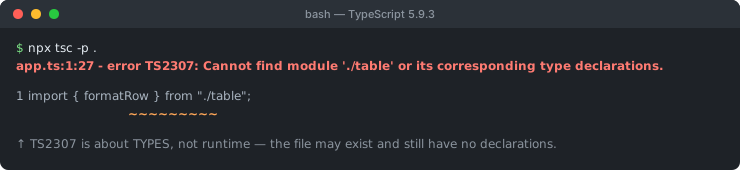
.d.ts.Both lines above throw the identical message, but for entirely different reasons — one is a third-party package with no types, the other is a local file whose name doesn't quite match. TypeScript deliberately collapses several distinct failures into one message, which is exactly why diagnosing TS2307 well means reading the module specifier, not just the error text.
How to diagnose it (read the import path first)
Before touching config, look at what's actually being imported:
- Starts with a package name, no
./or../→ a node_modules package. Check install + types (Fix 1 & 2). - Starts with
./or../→ a local file. Check the path, extension, and casing (Fix 3). - Starts with something like
@app/,~/, or#that isn't a real scoped package you installed → a path alias. Check it's mirrored everywhere (Fix 4). - The package installs and runs fine with plain Node, but TypeScript alone rejects it → a moduleResolution / exports-map mismatch (Fix 5).
- Importing
.json,.svg,.css, or another non-code asset → needs explicit TypeScript support (Fix 6). - A real build/runtime actually works, only your editor complains → a stale TS language-server cache (Fix 7).
- Fine on your machine, fails only in CI → a lockfile or
--save/--save-devmismatch (see the CI variant right after Fix 1).
Fix 1: the package genuinely isn't installed
The simplest cause is also the most common one during onboarding or after pulling a branch: node_modules is out of sync with package.json.
npm ls fancy-date-lib        # confirm it's actually installed
npm install fancy-date-lib   # install if missing
rm -rf node_modules package-lock.json && npm install   # nuke-and-reinstall if in doubt
In a monorepo, also confirm you're installing at the right workspace level — a package hoisted to the repo root won't help a package nested three levels down if your package manager's workspace linking isn't set up the way you think it is.
A CI-only variant: lockfile drift and npm ci
This same "not installed" cause has a distinctly CI-flavored shape: it works on every developer's machine and fails only in the pipeline. The usual culprit is npm ci, which installs strictly from package-lock.json and does not update it — unlike npm install, which reconciles package.json and the lockfile together.
# locally: package.json has the dependency, so `npm install` just works
npm install fancy-date-lib --save
# ✅ updates both package.json AND package-lock.json

# but if it was accidentally installed as a devDependency...
npm install fancy-date-lib --save-dev
# ❌ fine for local dev/test, but many CI pipelines run
#    `npm ci --omit=dev` for production builds — devDependencies
#    never get installed at all, and the build reports TS2307
Two concrete ways this shows up: someone commits a package.json change but forgets to commit the regenerated package-lock.json, so npm ci in CI installs a stale dependency tree that predates the new import; or a package genuinely needed at runtime gets installed with --save-dev by mistake, so it's simply absent the moment CI runs a production-only install. Fix: install with the correct flag for how the package is actually used, and always commit the lockfile in the same commit as the package.json change that produced it.
Fix 2: installed, but no types anywhere
npm install only guarantees the JavaScript exists. TypeScript separately needs a .d.ts — either bundled with the package itself, or published separately on DefinitelyTyped as @types/<package>. If neither exists, TS2307 is correct: there really is nothing to type-check against.
# check the package's own package.json for a "types" or "typings" field first
cat node_modules/fancy-date-lib/package.json | grep -E '"types"|"typings"'

# then try the community types package
npm install --save-dev @types/fancy-date-lib
If no @types package exists either, write a minimal ambient declaration yourself so TypeScript treats the module as typed (loosely) instead of missing entirely:
// src/types/fancy-date-lib.d.ts
declare module "fancy-date-lib" {
  export function formatDate(input: Date | string, pattern?: string): string;
}
Make sure this file is actually included by your tsconfig.json's include/files array — an ambient declaration TypeScript never loads doesn't help.
Fix 3: a wrong or case-mismatched local path
For relative imports, three sub-causes cover almost every case: a typo in the path, a missing/wrong extension, and — the one that bites hardest — filename casing that differs between your editor's OS and your CI runner's OS.
// file on disk is actually: src/utils.ts (lowercase u)
import { helper } from "./Utils";   // ❌ works on Mac/Windows, fails on Linux CI
import { helper } from "./utils";   // ✅ matches exactly
macOS and Windows filesystems are case-insensitive by default, so a casing mismatch resolves silently on your laptop and only explodes once it hits a case-sensitive Linux CI runner. Turn on this compiler flag so TypeScript catches it locally, before CI does:
{
  "compilerOptions": {
    "forceConsistentCasingInFileNames": true
  }
}
Fix 4: a path alias not mirrored outside tsconfig
This is the fix people miss most often, because it half-works: tsconfig.json's paths is a hint for the type-checker only. It does not rewrite anything at runtime, and most bundlers and test runners know nothing about it unless you tell them separately.
// tsconfig.json — the type-checker's view
{
  "compilerOptions": {
    "baseUrl": ".",
    "paths": { "@app/*": ["src/*"] }
  }
}
Editors that use the TypeScript language service (VS Code included) read this and resolve @app/utils just fine — which is exactly why it looks correct while you're writing the code. The same alias then needs to be mirrored, separately, in whichever tool actually runs your code:
// webpack.config.js
resolve: { alias: { "@app": path.resolve(__dirname, "src") } }

// vite.config.ts
resolve: { alias: { "@app": path.resolve(__dirname, "src") } }

// jest.config.js
moduleNameMapper: { "^@app/(.*)$": "<rootDir>/src/$1" }

// running plain ts-node/Node directly — needs a runtime resolver
node -r tsconfig-paths/register dist/index.js
Miss any one of these and that specific tool — not necessarily tsc itself — will report a module-not-found error, sometimes TS2307, sometimes its own bundler-flavored version of the same complaint.
Worked example: a React + Vite project
This exact scenario is one of the most common versions of Fix 4 in practice — a React component imported through an alias, in a Vite project:
// src/App.tsx
import Button from "@/components/Button";
// error TS2307: Cannot find module '@/components/Button' or its corresponding type declarations.
The editor may show no error at all if tsconfig.json already declares the alias — but vite build (or tsc run standalone in CI) fails, because Vite's own dev server and bundler have never been told about it:
// tsconfig.json
{
  "compilerOptions": {
    "baseUrl": ".",
    "paths": { "@/*": ["src/*"] }
  }
}

// vite.config.ts — the piece that's usually missing
import path from "path";
import { defineConfig } from "vite";

export default defineConfig({
  resolve: {
    alias: { "@": path.resolve(__dirname, "src") }
  }
});
Both files need the alias, and they need to agree: tsconfig.json's paths satisfies the type-checker (and your editor), while vite.config.ts's resolve.alias is what actually makes vite build, vite dev, and a standalone tsc run resolve the import for real.
Fix 5: moduleResolution vs a package's exports map
This is the newest and least understood cause. TypeScript's moduleResolution setting controls exactly how strictly it honors a package's package.json exports field:
| moduleResolution | Behavior |
|---|---|
node10 (formerly node, legacy) | Ignores exports entirely; walks main/types directly — more forgiving, sometimes resolves things that shouldn't work |
node16 / nodenext | Honors exports strictly, matching how Node itself resolves ESM — a missing "types" condition inside exports means TypeScript sees nothing, even if the package works at runtime |
bundler | Similar strictness to node16, tuned for bundlers that don't fully replicate Node's runtime resolution |
If a dual ESM/CJS package's exports map forgets to list a "types" condition (or lists it in the wrong order — it must come first), packages that run perfectly under plain Node will still throw TS2307 under the newer resolution modes. There is nothing wrong with your code in this case; it's the package's exports map that's incomplete. Report it upstream, pin an older version, or add a manual override via paths as a stopgap.
Fix 6: non-code assets need explicit TypeScript support
TypeScript only understands .ts/.tsx/.js out of the box. Two common asset imports need one extra step each:
// tsconfig.json — for importing .json files directly
{ "compilerOptions": { "resolveJsonModule": true } }// src/types/assets.d.ts — for importing .svg/.css/etc. (bundler-processed, not real JS)
declare module "*.svg" {
const content: string;
export default content;
}
declare module "*.css";Without one of these, importing data.json or icon.svg reports the exact same TS2307 as a missing npm package, because from TypeScript's perspective it is the same situation: an import target with no recognized module shape.
Fix 7: restart the TypeScript language server (editor-only staleness)
Not a root cause, but worth ruling out before you go further: your editor's TypeScript language service caches module resolution results, and that cache occasionally goes stale — especially right after installing a new package, adding a path alias, or switching git branches. If a plain terminal build (tsc, or your bundler's build command) actually succeeds while your editor keeps showing TS2307 on the same import, this is almost always the cause.
In VS Code:
- Open the Command Palette:
Ctrl+Shift+P(Cmd+Shift+Pon macOS) - Run TypeScript: Restart TS Server
Other editors with a TypeScript language service (WebStorm, Neovim with an LSP client) have an equivalent "restart language server" action. If restarting doesn't help, close and reopen the project entirely — a corrupted .tsbuildinfo incremental-build cache can occasionally survive a language-server restart but not a fresh editor launch.
Worked example: a monorepo package that hasn't been built yet
A workspace layout with packages/shared and packages/app, where app imports from @myorg/shared:
import { formatId } from "@myorg/shared";
// error TS2307: Cannot find module '@myorg/shared' or its corresponding type declarations.
The package exists in the workspace and is correctly listed as a dependency — but its package.json "main"/"types" fields point at a dist/ folder that hasn't been generated yet, because the build order ran app before shared. This is a build-graph problem, not a TypeScript problem: build (or watch) the dependency package first, or configure your monorepo tool's task graph (Turborepo, Nx, or npm/pnpm/yarn workspaces with an explicit build dependency) so shared always builds before anything that imports it.
Common variants of this message
| Situation | Real cause | Fix |
|---|---|---|
| Package name, no local path prefix | not installed, or no types | Fix 1 / Fix 2 |
./ or ../ path | typo, extension, or casing | Fix 3 |
Custom alias (@app/, ~/) | not mirrored in bundler/test runner | Fix 4 |
Works with plain Node, fails only in tsc | moduleResolution vs package exports | Fix 5 |
.json/.svg/.css import | no TypeScript asset support configured | Fix 6 |
| Editor shows it, but a real build succeeds | stale TS language-server cache | Fix 7 |
| Works locally, fails only in CI | lockfile drift, or --save-dev instead of --save | npm ci variant |
| Monorepo internal package | dependency package not built yet | fix build order |
Debugging checklist
- ✓ Read the import specifier first: package name, local path, or alias?
- ✓ Package:
npm ls <pkg>to confirm it's actually installed - ✓ Package installed but still failing? Check for bundled types, then
@types/<pkg>, then write your owndeclare module - ✓ Only fails in CI? Check for lockfile drift, or the package being installed with
--save-devwhen a production build needs it - ✓ Local path: verify the exact filename casing matches on disk (turn on
forceConsistentCasingInFileNames) - ✓ Alias: is it mirrored in webpack/vite/jest/ts-node, not just
tsconfig.json? - ✓ Runs fine under plain Node but not
tsc? CheckmoduleResolutionvs the package'sexportsmap - ✓ Importing
.json/.svg/.css? EnableresolveJsonModuleor add an ambientdeclare module - ✓ Editor-only, and a real build actually succeeds? Restart the TS language server before debugging further
- ✓ Monorepo? Confirm the dependency package has actually been built before the one importing it
Frequently Asked Questions
What does TS2307 actually mean?
It means TypeScript's module resolver looked everywhere it knows to look — node_modules, your tsconfig paths, ambient declaration files — and found absolutely nothing for that import specifier: no .js/.ts file and no .d.ts. It is a stronger failure than 'has no exported member' or an implicit-any warning; the module target simply isn't there from TypeScript's point of view.
How is TS2307 different from TS7016?
TS7016 ('implicitly has an any type') fires when a module is found and loads at runtime, but TypeScript can't find type declarations for it — so it falls back to any under noImplicitAny. TS2307 is the harder case: nothing resolves at all, not even a fallback any. If your build actually runs at runtime but only the type-checker complains, you likely have TS7016, not TS2307.
Why does it work in one editor but fail in tsc or CI?
The most common reason is filename casing. macOS and Windows filesystems are case-insensitive by default, so ./Utils resolves fine locally even if the real file is utils.ts. Linux CI runners are case-sensitive, so the same import fails there with TS2307. Turn on forceConsistentCasingInFileNames in tsconfig.json to catch this locally before it reaches CI.
I installed the package — why does TypeScript still say it can't find it?
npm install only guarantees the JavaScript is there; it says nothing about types. If the package ships no bundled .d.ts files and no matching @types/<package> exists on npm, TypeScript has nothing to type-check against and reports TS2307. Check the package's own README for TypeScript support, or write a minimal ambient declaration yourself.
Why do path aliases work in the editor but fail when I run tsc or build?
tsconfig.json's compilerOptions.paths is a type-checking hint only — it doesn't rewrite anything at runtime or in most bundlers by itself. Webpack, Vite, Jest, and Node each need the same alias mirrored in their own config (resolve.alias, moduleNameMapper, or a runtime package like tsconfig-paths). Miss one and that tool reports TS2307 or its own module-not-found error even though tsc alone is happy.
Does moduleResolution matter for this error?
Yes. Under the older node10 (classic 'node') resolution, TypeScript ignores a package's exports field and just walks main/types directly, which can find things that newer resolution won't. Under node16/nodenext/bundler resolution, TypeScript respects package.json exports strictly — a dual ESM/CJS package with a misconfigured or missing types condition in exports will fail to resolve even though the package works fine at runtime with plain Node.
Can importing a JSON or SVG file cause TS2307?
Yes. TypeScript doesn't understand non-code file extensions out of the box. Importing a .json file needs resolveJsonModule: true in tsconfig.json. Importing assets like .svg, .css, or .png needs an ambient module declaration (declare module '*.svg') in a .d.ts file included by your project, otherwise TypeScript reports it can't find the module or its declarations.
References
- Module Resolution (TypeScript Handbook)
- moduleResolution (TSConfig Reference)
More TypeScript & JSON errors
Browse the full reference, or generate accurate interfaces from your JSON.