Quick answer
TypeScript couldn't resolve the identifier X to any declaration in scope. Match your case to one of these:
- It's from another module — you forgot the
import(most common). - It's a Node global (
process,require,Buffer) — install@types/node. - It's a browser global (
document,window) — add"DOM"totsconfiglib. (fetchin Node? See Fix 3.) - It's a typo or wrong casing — TypeScript often suggests the intended name (TS2552).
- It's a test global (
describe,expect) — install the test framework's@types. - You declared it yourself in a
.d.tsfile, but it's still not found — the file isn't intsconfiginclude.
The exact error string
const id = randomUUID();
// error TS2304: Cannot find name 'randomUUID'.

console.log(process.env.NODE_ENV);
// error TS2304: Cannot find name 'process'.

document.querySelector("#app");
// error TS2304: Cannot find name 'document'.
What it actually looks like
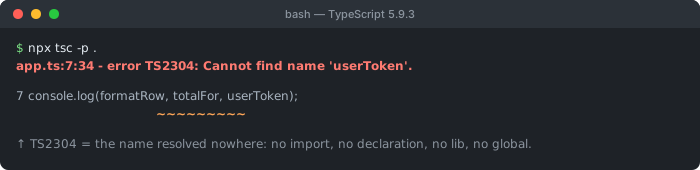
lib entry, no ambient global. That is what separates it from TS2307, where the name is fine and the module is not.All three lines throw the same error code for genuinely different reasons: a missing import, a missing Node type package, and a missing DOM library. TS2304 is TypeScript telling you a single name has no declaration it can see — not a syntax problem and not a whole-module failure (that's TS2307). Diagnosing it well means asking one question first: what kind of name is this?
How to diagnose it (what kind of name is X?)
- A value/type you wrote in another file → missing import (Fix 1).
process,require,__dirname,Buffer,module→ Node globals, need@types/node(Fix 2).document,window,localStorage→ browser/DOM globals, need the DOM lib (Fix 3). (fetchis different in Node — see Fix 3.)- TypeScript says “Did you mean…?” → a typo or casing mistake (Fix 4).
describe,it,expect,jest,vi→ test-runner globals, need their types (Fix 5).- You wrote a
.d.tsdeclaring it yourself, but TS still can't see it → ambient declaration not picked up (Fix 6).
Fix 1: a missing import (the most common cause)
In application code, this is the overwhelming majority of TS2304 errors. You referenced something exported by another module but never imported it:
// ❌ randomUUID is never imported
const id = randomUUID();

// ✅ import it from the module that exports it
import { randomUUID } from "crypto";
const id = randomUUID();
Your editor almost always offers a lightbulb quick-fix (“Add import from…”) — accept it and move on. When the auto-import doesn't appear, it usually means the exporting module itself can't be resolved, which is a TS2307 problem hiding underneath; fix that first and the import suggestion returns.
Fix 2: Node globals (process, require, Buffer, __dirname)
These identifiers exist at runtime in Node, but TypeScript ships no types for them by default. Install the Node type definitions:
npm install --save-dev @types/nodeThen make sure your tsconfig.json actually loads them. If you set compilerOptions.types at all, it becomes an allow-list — anything not listed is excluded, including @types/node:
{
  "compilerOptions": {
    "types": ["node"]   // ✅ if you list types at all, include "node"
    // omitting "types" entirely also works — then ALL @types packages load
  }
}
Fix 3: browser/DOM globals (document, window, fetch)
DOM globals get their types from TypeScript's built-in DOM library, which is included automatically unless you override lib. If you set lib manually and left DOM out, browser globals stop resolving:
{
  "compilerOptions": {
    "lib": ["ES2022", "DOM", "DOM.Iterable"]   // ✅ add "DOM" back
  }
}
For code that never touches the browser (a pure Node service), the correct move is the opposite — keep DOM out so a stray document reference is caught at compile time rather than crashing at runtime. fetch deserves a special note: it isn't strictly a DOM-only global anymore. Browsers provide it through the DOM lib, but Node 18+ ships fetch natively at runtime, and its types come from @types/node, not DOM. If fetch is undefined in a Node file, install/update @types/node (Fix 2) rather than adding DOM to lib — pulling in the full DOM lib for a Node project brings along browser types (like Window) that don't exist at runtime and can mask real bugs.
Fix 4: a typo or wrong casing
When TypeScript can find a nearby declaration with a similar name, it upgrades the message to TS2552 and suggests the fix:
const user = getUserByID(1);
getUserById(user);
// error TS2552: Cannot find name 'getUserById'. Did you mean 'getUserByID'?
That “Did you mean” line is the strongest possible hint — it's almost always a casing or spelling slip. Plain TS2304 with no suggestion points the other way: the name isn't declared anywhere nearby, so look at Fixes 1–3 instead.
Fix 5: test-runner and framework globals
Globals injected by a test runner (describe, it, expect, jest, vi, beforeEach) need their type packages installed and referenced:
# Jest
npm install --save-dev @types/jest

# Vitest — enable globals in the config instead of importing them everywhere
// vitest.config.ts
export default { test: { globals: true } }
// tsconfig.json
{ "compilerOptions": { "types": ["vitest/globals"] } }
A frequent trap here: a separate tsconfig for tests that forgets to include the test types, or a test file that falls outside the include glob of any tsconfig. If the tests run but the editor still flags the globals, the file simply isn't covered by a tsconfig that references the right types — add it to include.
Fix 6: your own ambient declaration isn't being picked up
This one is the most confusing to hit, because the declaration is sitting right there in your own codebase and TypeScript still won't recognize it. It happens when a custom .d.ts file declares a global, but the TypeScript program never actually parses that file:
// globals.d.ts
declare const API_URL: string;

// somewhere else in the project
console.log(API_URL);
// error TS2304: Cannot find name 'API_URL' — even though globals.d.ts declares it right there
Two separate things can cause this, and they need different fixes:
- The
.d.tsfile isn't covered bytsconfig.json'sinclude(or is caught byexclude). TypeScript only looks at files reachable frominclude/filesplus whatever those files import — a straytypes/globals.d.tsoutside that graph is silently never read. Add its path (or its containing folder) toinclude. - The
.d.tsfile accidentally became a module. A declaration file with no top-levelimportorexportis treated as a global script, and everything in it merges into global scope. The moment you add any top-levelimport/exportto that same file, TypeScript treats it as a module instead, and its contents stop being global automatically. To declare globals from a module-shaped file, wrap them explicitly:
// globals.d.ts — this file has other imports, so it's a module, not a script
import type { SomeType } from "./types";

declare global {
  const API_URL: string;
  interface Window {
    myAppVersion: string;
  }
}

export {};   // required so the file is a module and declare global has an effect
The search terms that land here are usually “typescript cannot find name global variable”, “typescript declare global variable”, or “typescript global.d.ts not working” — if that's your situation, check include first, then check whether the file has an import/export without a matching declare global block.
Common variants of this message
| The name | What it is | Fix |
|---|---|---|
| Something from your own code | missing import | Fix 1 |
process, require, Buffer | Node globals | @types/node (Fix 2) |
document, window, fetch | DOM globals | add "DOM" to lib (Fix 3) |
| Says “Did you mean…?” | typo / casing | Fix 4 |
describe, expect, jest | test-runner globals | install test @types (Fix 5) |
| A type you use only as a type | missing import type | Fix 1 (use import type) |
fetch (in a Node file) | Node 18+ runtime global | @types/node, not DOM (Fix 2) |
You see it declared in your own .d.ts | ambient declaration not loaded | Fix 6 |
Debugging checklist
- ✓ Is
Xdefined in another file? Add the import (accept the editor's quick-fix) - ✓ Is it a Node global?
npm i -D @types/node, and include"node"if you settypes - ✓ Is it a browser global? Add
"DOM"tocompilerOptions.lib - ✓ Does TypeScript say “Did you mean”? It's a typo — accept the suggestion
- ✓ Is it a test global? Install
@types/jest/ enablevitest/globals - ✓ Is it
fetchin a Node file? Update@types/node, notlib - ✓ Declared it yourself in a
.d.ts? Checktsconfiginclude, and whether the file needsdeclare global { }+export {} - ✓ Editor-only, but the build works? Restart the TS server to clear a stale cache
Frequently Asked Questions
What does TS2304: Cannot find name mean?
TypeScript tried to resolve an identifier — a variable, function, type, or global — and found no declaration for it anywhere in scope. Unlike TS2307 (which is about a whole module not resolving), TS2304 is about a single name inside your code that TypeScript has never seen declared: you either forgot to import it, forgot to declare it, misspelled it, or it's a runtime global whose type definitions aren't loaded.
Why does TypeScript say 'Cannot find name process' or 'Cannot find name require'?
process, require, __dirname, Buffer and module are Node.js globals. TypeScript doesn't know their types until you install the Node type definitions and include them: run npm install --save-dev @types/node, and make sure your tsconfig.json includes "node" in compilerOptions.types (or leaves types unset so all @types packages load). The values exist at runtime via Node; the error is purely about missing type declarations.
Why does 'Cannot find name document' or 'window' happen?
document, window and localStorage are browser DOM globals. Their types come from the DOM library, which TypeScript only includes when "DOM" is in your tsconfig.json compilerOptions.lib. If you set lib manually (for example to ["ES2022"]) you dropped the DOM types; add "DOM" back to the lib array to make browser globals resolve. fetch is a special case: browsers provide it through the DOM types, but modern Node (18+) provides fetch natively at runtime and types it separately via @types/node — so a missing fetch in Node code points at Fix 2, not Fix 3.
How is TS2304 different from TS2552 'did you mean'?
TS2552 is the same underlying failure but TypeScript found a close match and suggests it — “Cannot find name getUserById. Did you mean getUserByID?” That's a strong signal it's a typo or casing mistake. Plain TS2304 with no suggestion usually means the name isn't declared or imported anywhere close, pointing at a missing import or missing type library rather than a misspelling.
Can a missing import cause Cannot find name?
Yes — this is the most common cause in application code. If you use a value, class, or type from another module but never wrote the import statement for it, TypeScript has no declaration in scope and reports TS2304. Editors usually offer a quick-fix “Add import” code action; accept it, or write the import manually. This also covers auto-import failing when the exporting module isn't found.
Why does it happen only in certain files, like test or config files?
Test globals such as describe, it, expect, jest or vi need their type packages (@types/jest, @types/mocha, or vitest/globals) installed and referenced. A file that isn't covered by your tsconfig.json include/files array, or a separate tsconfig for tests that omits the right types, will report TS2304 on those globals even though the tests run fine. Add the test type package and make sure the file is in a tsconfig that references it.
I declared the name myself in a .d.ts file — why does TypeScript still say Cannot find name?
Two common causes. First, the .d.ts file may not be covered by tsconfig.json's include (or is caught by exclude) — TypeScript only reads files reachable from include/files, so a stray declarations file outside that graph is silently never parsed. Second, if that same file has any top-level import or export, TypeScript treats it as a module rather than a global script, and its declarations stop being global automatically — wrap them in declare global { ... } and add export {} to restore global scope.
References
More TypeScript & JSON errors
Browse the full reference, or generate accurate interfaces from your JSON.