Quick answer
Your file is running as an ES module, where require() does not exist. Use import instead — or recreate require with createRequire(import.meta.url), or rename the file to .cjs to run it as CommonJS.
The exact error string
const express = require('express');
                ^

ReferenceError: require is not defined in ES module scope, you can use import instead
This file is being treated as an ES module because it has a '.js' file
extension and '/app/package.json' contains "type": "module". To treat it
as a CommonJS script, rename it to use the '.cjs' file extension.
    at file:///app/index.js:1:17
What it actually looks like
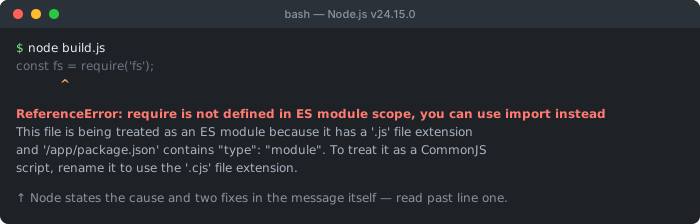
"type": "module" in package.json) and two ways out (use import, or rename the file to .cjs). Most readers stop at line one and miss both.Node's message is unusually helpful: it tells you exactly why the file is ESM (a .js extension plus "type": "module") and offers the .cjs escape hatch. The root cause is always the same — CommonJS require() in an ES module context.
Why require does not exist in ESM
require(), module.exports, __dirname, and __filename are CommonJS-only globals. Node injects them into every CommonJS module, but ES modules are a different specification — they use import/export and the import.meta object instead. When a file is treated as ESM, those CommonJS globals are simply not in scope, so referencing require throws a ReferenceError.
A file becomes an ES module when it ends in .mjs, or the nearest package.json contains "type": "module". Adding that type field to enable import elsewhere is the most common way people accidentally break a file that still uses require() — which is exactly when Node prints ReferenceError: require is not defined in ES module scope, you can use import instead.
CommonJS vs ES modules
Every CommonJS global has an ES module equivalent. When you convert a file, swap each one for its ESM counterpart:
| Feature | CommonJS | ES modules (ESM) |
|---|---|---|
| Import a module | require() | import |
| Export | module.exports | export / export default |
| Current file path | __filename | import.meta.filename |
| Current directory | __dirname | import.meta.dirname |
| Resolve a path | require.resolve() | import.meta.resolve() |
| Conditional/lazy load | require() inline | await import() (dynamic) |
| Enabled by | default for .js | .mjs or "type": "module" |
Fix 1: use import (recommended)
The idiomatic fix is to convert require() to import and module.exports to export:
// ❌ CommonJS in an ES module
const express = require('express');
const { readFile } = require('node:fs/promises');
module.exports = app;

// ✅ ES module syntax
import express from 'express';
import { readFile } from 'node:fs/promises';
export default app;
Fix 2: recreate require with createRequire
Sometimes you cannot easily drop require() — for example, importing a JSON file the old way, or using require.resolve(). Node's built-in node:module lets you rebuild a working require inside an ES module:
import { createRequire } from 'node:module';
const require = createRequire(import.meta.url);

const config = require('./config.json');   // require() works again
const pkgPath = require.resolve('some-pkg');
This is the cleanest bridge when a CommonJS-only API has no ESM equivalent. (For JSON specifically, modern Node also supports import data from './config.json' with { type: 'json' } — formerly spelled assert { type: 'json' }, which you may still see in older code.)
Fix 3: replace __dirname and __filename
The same ESM/CommonJS split removes __dirname and __filename — a very common follow-on error. Recreate them from import.meta.url:
import { fileURLToPath } from 'node:url';
import { dirname } from 'node:path';

const __filename = fileURLToPath(import.meta.url);
const __dirname = dirname(__filename);

// Node 20.11+ / 21.2+ expose these directly:
// import.meta.dirname  and  import.meta.filename
Fix 4: force CommonJS with .cjs
If the file should stay CommonJS — an old script you do not want to rewrite — rename it to .cjs. That extension forces Node to run it as CommonJS regardless of the "type": "module" setting, so require() works again:
mv script.js script.cjs
node script.cjs   # require() works; the package "type" no longer applies
If the entire project should be CommonJS, the simpler fix is to remove "type": "module" from package.json — but then any import statements will break with the mirror error, Cannot use import statement outside a module.
TypeScript and ts-node
With TypeScript you can hit require is not defined in ES module scope even though your source uses import — because the compiled output, or a stray require() you wrote, runs as ESM. The fix is to make tsconfig.json and package.json agree on a module system. For modern Node ESM, use the NodeNext settings:
// tsconfig.json — compile to real ESM
{
  "compilerOptions": {
    "module": "NodeNext",
    "moduleResolution": "NodeNext",
    "target": "ES2022"
  }
}
// package.json has "type": "module"
The error usually comes from a mismatch: package.json has "type": "module" while tsconfig emits "module": "CommonJS" (or vice-versa), so a require() in the output lands in an ESM context. Pick one system and align both files. If you would rather stay on CommonJS, set "module": "CommonJS" in tsconfig and remove "type": "module" from package.json — then require() works because the output runs as CommonJS.
For ts-node, run it with the ESM loader (node --loader ts-node/esm src/index.ts) when the project is ESM, so your TypeScript is executed as ES modules rather than being wrapped in a CommonJS shim that reintroduces require.
Debugging checklist
- ✓ Read Node's message — it names the file and why it is ESM (
.mjsortype: module) - ✓ Convert
require()→importandmodule.exports→export(preferred) - ✓ Must keep
require? UsecreateRequire(import.meta.url)fromnode:module - ✓
__dirname/__filenamealso gone? Derive them fromimport.meta.url - ✓ Want CommonJS for this file only? Rename it to
.cjs - ✓ Want CommonJS project-wide? Remove
"type": "module"(watch for the mirror import error) - ✓ TypeScript? Make
tsconfig'smoduleandpackage.json'stypeagree; usets-node/esmfor ESM
Frequently Asked Questions
What does require is not defined in ES module scope mean?
It means your file is being run as an ES module, where the CommonJS require() function does not exist. A file becomes an ES module when it ends in .mjs or the nearest package.json has "type": "module". In that context you must use import instead of require, because require, module.exports, __dirname, and __filename are CommonJS-only globals.
How do I fix it?
Replace require() with an import statement, which is the idiomatic ESM way. If you cannot easily convert (for example, requiring a JSON file or a CommonJS-only package), recreate require with createRequire from node:module. Alternatively, rename the file to .cjs to run it as CommonJS, or remove "type": "module" from package.json if the whole project should be CommonJS.
How do I use require for a CommonJS package inside an ES module?
Most CommonJS packages can be imported directly with a default import. If you genuinely need require() — for instance to load a JSON file or use require.resolve — recreate it: import { createRequire } from 'node:module'; const require = createRequire(import.meta.url); Then require() works within that ES module.
Why is __dirname not defined too?
__dirname and __filename are CommonJS-only globals and do not exist in ES modules. Recreate them from import.meta.url: import { fileURLToPath } from 'node:url'; import { dirname } from 'node:path'; const __filename = fileURLToPath(import.meta.url); const __dirname = dirname(__filename). Newer Node also exposes import.meta.dirname and import.meta.filename directly.
Should I switch the file to .cjs or convert to import?
Converting to import is the better long-term choice and keeps the file as a modern ES module. Rename to .cjs only when you have a CommonJS file that you want to keep as-is inside an otherwise-ESM project — the .cjs extension forces CommonJS regardless of the package.json type field.
What is the difference between this and Cannot use import statement outside a module?
They are opposites. require is not defined in ES module scope means CommonJS require() is running in an ES module. Cannot use import statement outside a module means ESM import is running in a CommonJS file. Both are caused by mixing the two module systems; choose one per file and use it consistently.
References
- ECMAScript modules (Node.js docs)
- package.json "type" field (Node.js docs)
Working with a JSON API?
Format and validate any JSON response in your browser — nothing is uploaded to a server.