⚡ Fastest fix
If other apps are online but Chrome insists you're not, this is almost always a stale OS-level connectivity flag, not a real outage. Toggle the network adapter off and back on (or airplane mode on/off) to force the OS to re-evaluate:
# Windows — quick adapter reset from an elevated PowerShell prompt:
Disable-NetAdapter -Name "Wi-Fi" -Confirm:$false
Enable-NetAdapter -Name "Wi-Fi" -Confirm:$false
What you're seeing
No internet
There is something wrong with the proxy server, or the address is incorrect.
ERR_INTERNET_DISCONNECTED
What it actually looks like
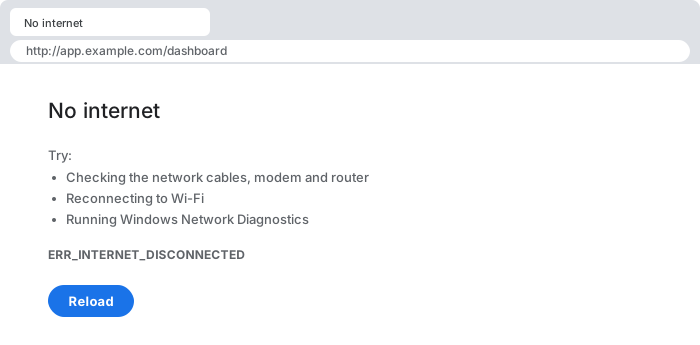
This error is unusual among Chrome's network errors because it's not actually about the specific site you tried to reach at all. Before Chrome even attempts to resolve DNS or open a socket to a destination, it asks the operating system a much more basic question: "do you currently believe you have any network connectivity?" This error means the OS answered "no" — which is why it appears identically for every single site you try, and why the fix is almost never anything to do with the site itself.
30-second triage
- Other apps (Slack, a native app, another browser) work fine? → Fix 1 (stale OS connectivity flag)
- On hotel/airport/cafe Wi-Fi, just connected? → Fix 2 (captive portal)
- Running a VPN client, especially one that crashed or disconnected oddly? → Fix 3 (VPN adapter/routing table)
- Started after a router/ISP change, IPv6 involved? → Fix 4 (broken IPv6 route)
Fix 1 — stale OS-level connectivity state (the most common cause)
When: other applications on the same machine are clearly online, but every site in Chrome fails identically.
# Windows — reset the adapter (elevated PowerShell):
Disable-NetAdapter -Name "Wi-Fi" -Confirm:$false; Start-Sleep 2
Enable-NetAdapter -Name "Wi-Fi" -Confirm:$false

# macOS — toggle via networksetup:
networksetup -setairportpower en0 off && sleep 2 && networksetup -setairportpower en0 on

# Linux (NetworkManager):
nmcli radio wifi off && sleep 2 && nmcli radio wifi on

# last resort: fully quit Chrome (not just close the window) and relaunch,
# forcing it to re-query connectivity state from scratch
Operating systems maintain their own internal, cached belief about network connectivity — on Windows this is the Network Location Awareness (NLA) service; macOS and Linux have their own equivalents — and applications like Chrome query that cached state rather than performing a live check on every single request, for performance reasons. That cache can desync from reality: a Wi-Fi driver reporting a stale link-up/link-down event, a VPN client partially reconfiguring adapters without the OS's connectivity monitor noticing, or simply a race condition during a network transition (waking from sleep, switching Wi-Fi networks). Forcing the adapter through a full disable/enable cycle (or toggling airplane mode) makes the OS re-evaluate its connectivity state from scratch, which resolves the desync in the overwhelming majority of cases without touching any actual network configuration.
Fix 2 — a captive portal Chrome doesn't recognize correctly
When: you just joined public Wi-Fi (hotel, airport, cafe, conference) and haven't seen a login/terms page yet.
# try a plain, unencrypted HTTP address directly — portals typically
# can't intercept HTTPS without triggering a cert warning, but they
# rewrite HTTP freely:
http://neverssl.com/
http://example.com/
Captive portals work by intercepting all outgoing traffic at the network gateway and substituting their own login/terms page until you authenticate — a deliberate man-in-the-middle-style redirect that's normally invisible to the user because most operating systems run their own captive-portal detection probe and pop the login page up automatically. When that detection probe's specific request format or expected response doesn't match what the portal is prepared to intercept correctly, the OS can conclude there's no usable network at all rather than surfacing the portal, and Chrome inherits that incorrect conclusion. Navigating directly to a plain HTTP address (never HTTPS, which most portals can't rewrite without breaking certificate validation and causing a much more visible warning) reliably surfaces the actual login page.
Fix 3 — a VPN client left the routing table broken
When: a VPN client is running, was recently disconnected, or crashed unexpectedly.
# Windows — inspect the current default route:
route print -4
# look for a default route (0.0.0.0) still pointing at a VPN's virtual
# adapter that no longer has a live connection behind it

# fully quit the VPN client (not just "disconnect" in its UI, which
# sometimes leaves routes behind) and check again:
route print -4
VPN clients commonly work by installing a virtual network adapter (a TAP/TUN-style device) and modifying the system's routing table so that some or all outbound traffic is directed through that adapter instead of the physical one. This is normal and expected while connected — the problem arises when the client terminates uncleanly (a crash, a forced process kill, an unexpected network change it didn't handle gracefully) and leaves the routing table pointing at a virtual adapter that no longer has any live tunnel behind it. The OS, quite correctly, reports that it has no working route to reach the internet, because as far as its routing table is concerned, that's true — the physical Wi-Fi or Ethernet connection is irrelevant if the default route doesn't point at it anymore.
Fix 4 — IPv6 assigned but not actually routed
When: this started after a router firmware update, an ISP change, or joining a network you don't administer yourself.
# check whether you actually have working IPv6, not just an assigned address:
curl -6 -v https://ipv6.google.com/   # should succeed if IPv6 truly works
ping -6 2001:4860:4860::8888          # Google's public IPv6 DNS, as a raw reachability test

# if these hang/fail while IPv4 works fine, disable IPv6 on the adapter
# as a pragmatic workaround (Windows, elevated PowerShell):
Disable-NetAdapterBinding -Name "Wi-Fi" -ComponentID ms_tcpip6
A router can hand out a valid, globally-routable-looking IPv6 address via router advertisement (SLAAC) even when the upstream ISP link doesn't actually forward IPv6 traffic anywhere — a common half-finished IPv6 rollout scenario. The OS sees a valid IPv6 address and default route and considers itself "connected" over IPv6, but every packet sent that way disappears into a dead end. Depending on which network path a given connectivity check happens to use at that moment, this half-broken state can surface inconsistently — sometimes as a same-site connection failure, sometimes (particularly if the OS-level connectivity probe itself uses IPv6) as this broader disconnected-internet report. Disabling IPv6 on the affected adapter is a blunt but reliable workaround until the network's IPv6 configuration is actually fixed upstream.
Why this happens: a connectivity check is a proxy, not a guarantee
The deeper reason this error is so often misleading is that "internet connectivity" isn't a single boolean fact the OS can query directly — it's inferred from a handful of heuristics (interface link state, presence of a default route, and often a lightweight HTTP probe to a known-good endpoint) that are each individually fallible. Chrome trusts the OS's answer rather than re-deriving connectivity itself on every request, which is the right performance trade-off almost all the time, but means that whenever one of those underlying heuristics is wrong — a stale link-state flag, a dangling route left by a crashed VPN, a captive portal's probe response not matching expectations, a half-configured IPv6 rollout — the error surfaces as a blanket "no internet" rather than anything specific enough to point at the real cause. That's exactly why the useful diagnostic step is always the same: check whether *anything else* on the machine can actually reach the network, since that single comparison instantly tells you whether to trust Chrome's report or treat it as a stale/incorrect signal.
Common causes at a glance
| Situation | Root cause | Fix |
|---|---|---|
| other apps work, only Chrome fails | stale OS network-state cache | toggle adapter/airplane mode, relaunch Chrome |
| public Wi-Fi, just connected | captive portal not detected correctly | navigate to a plain HTTP address directly |
| VPN client crashed/disconnected oddly | default route still points at a dead virtual adapter | fully quit VPN client, verify routing table |
| router/ISP change, IPv6 involved | IPv6 address assigned but not actually routed upstream | disable IPv6 on the adapter as a workaround |
Debugging checklist
- ✓ Confirm whether another application on the same machine can actually reach the network
- ✓ Toggle the network adapter (or airplane mode) off/on to force an OS-level re-check
- ✓ On public Wi-Fi, try a plain
http://address to surface a hidden captive portal - ✓ Check
route print/ip routefor a default route pointing at a dead VPN adapter - ✓ Test IPv6 specifically (
curl -6) if this coincided with a router/ISP change
Frequently Asked Questions
What does net::ERR_INTERNET_DISCONNECTED mean?
Chrome (and Chromium-based browsers) query the operating system for its current network connectivity state before even attempting a request, and this error fires when that OS-level check reports no active connection. Crucially, this is a query about the OS's own belief about connectivity, not a live probe of the specific site you're trying to reach — which is why it can fire even while other applications on the same machine are transferring data successfully.
Why does this happen even though Wi-Fi shows as connected and other apps work fine?
This is the most confusing and most common variant. It usually means the OS's network-state API and the actual working connection have desynchronized — often caused by a VPN client that partially reconfigures network adapters without fully registering the change, a Wi-Fi driver that reports a stale link-state to the OS, or (on Windows specifically) the Network Location Awareness service caching an outdated connectivity profile. Toggling airplane mode off/on, or disabling/re-enabling the network adapter, forces the OS to re-evaluate and usually resyncs the two.
Can a captive portal (hotel/airport Wi-Fi) cause this specific error?
Yes. A captive portal intercepts all traffic and redirects it to a login/terms page until you authenticate, but some captive portal implementations respond in ways that don't match what Chrome's connectivity probe expects, causing Chrome to conclude there's no real internet access at all rather than showing the portal. Opening a plain, unencrypted HTTP page (not HTTPS) directly is the standard workaround, since portals typically can't intercept and redirect HTTPS traffic without triggering a certificate warning instead.
Why would a VPN client cause this error specifically?
Many VPN clients work by creating a virtual network adapter and rewriting the system's routing table to send some or all traffic through it. If the VPN client crashes, disconnects uncleanly, or fails to fully tear down its routing changes, the OS can be left in a state where its default route points at a now-nonexistent adapter — the OS correctly reports "no route to reach anything," and Chrome surfaces that as a disconnected-internet error even though the physical Wi-Fi/Ethernet connection itself is completely fine.
Does IPv6 misconfiguration ever cause this?
Yes, in a specific and often-overlooked way: if the OS reports IPv6 connectivity as available (an IPv6 address was assigned via router advertisement) but the actual upstream network doesn't route IPv6 traffic anywhere, connectivity checks that specifically probe over IPv6 can fail while IPv4 works perfectly — and depending on which check Chrome/the OS relies on at that moment, this can surface as a disconnected state rather than a same-site connection problem.
Is this ever a Chrome-specific bug rather than an actual OS/network issue?
Occasionally, yes — Chrome caches its own belief about connectivity state internally and doesn't always re-check the OS as promptly as it should after a network change. If disabling/re-enabling the adapter and confirming other applications work doesn't resolve it, fully quitting and relaunching Chrome (not just closing the window) forces it to re-query connectivity state from scratch.
References
- Navigator: onLine property (MDN)
- Window: offline event (MDN)
More network errors
Browse the full reference for network, connectivity, and browser errors — exact message, cause, and fix.