⚡ Fastest fix
Silence, not rejection: no response ever came back. If this is your own server on a cloud provider, the #1 cause is a missing inbound firewall/security-group rule for that port:
# raw TCP reachability check — bypasses HTTP entirely:
nc -vz your-server-ip 443
# Windows PowerShell equivalent:
Test-NetConnection your-server-ip -Port 443
What you're seeing
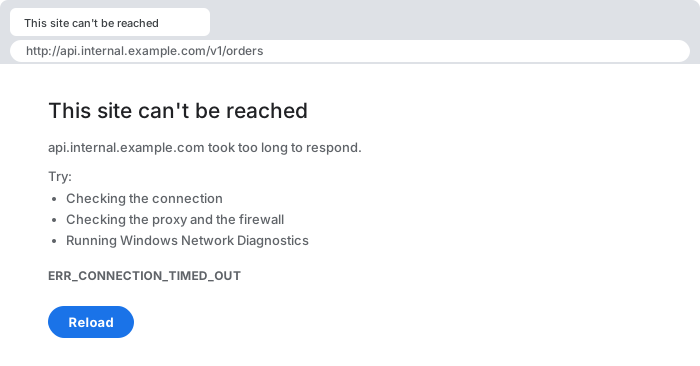
This site can't be reached
example.com took too long to respond.
ERR_CONNECTION_TIMED_OUT

// or, for a background API call:
Failed to load resource: net::ERR_CONNECTION_TIMED_OUT
What it actually looks like
ERR_CONNECTION_REFUSED instead — a different diagnosis.The word "timed out" is the important detail here, and it's worth distinguishing precisely from a rejection. When a server actively refuses a connection — nothing listening on the port — the operating system responds immediately with a TCP RST packet, and the browser reports a different, near-instant error. A timeout means the client sent its SYN packet(s) and simply never got a reply of any kind within its wait window (commonly somewhere in the 60-180 second range depending on the OS/browser network stack) — the request went into silence, not rejection, and that distinction is the single most useful diagnostic signal you have.
30-second triage
- Your own cloud server (AWS/GCP/Azure/DigitalOcean)? → Fix 1 (security group/firewall rule)
- Domain recently moved hosts or changed IP? → Fix 2 (stale DNS)
- Intermittent, correlates with traffic spikes? → Fix 3 (server overload)
- Fails only after the connection has been idle for a while? → Fix 4 (dead keep-alive connection)
Fix 1 — missing inbound firewall/security-group rule
When: it's your own server, freshly provisioned, or you just changed which port the application listens on.
# confirm the app is actually listening locally, on the server itself:
ss -tlnp | grep :443          # or: netstat -tlnp | grep :443

# then confirm it's reachable from outside — run this from your own machine:
nc -vz your-server-ip 443
# "Connection timed out" here + "listening" above = a firewall is the gap

# AWS CLI — check the security group actually allows this port inbound:
aws ec2 describe-security-groups --group-ids sg-xxxxxxxx \
  --query "SecurityGroups[0].IpPermissions"
Cloud security groups and firewalls (AWS security groups, GCP firewall rules, Azure NSGs, or a plain iptables/ufw ruleset on the box itself) default to denying everything not explicitly allowed. Critically, this default-deny behavior is usually implemented as a silent packet drop rather than an active rejection — the incoming SYN packet is discarded at the network layer before it ever reaches the application, and no RST is sent back. From the client's point of view this is indistinguishable from the server being completely powered off; the only way to tell the difference is to check the firewall configuration directly, since the network-level symptom looks identical either way.
Fix 2 — stale DNS pointing at a dead or migrated IP
When: the domain was recently moved to a new host/provider, or a server was decommissioned and replaced.
# see what your resolver currently returns:
dig example.com +short
nslookup example.com

# compare against an authoritative, uncached source (Google's DNS-over-HTTPS):
curl -s "https://dns.google/resolve?name=example.com&type=A"

# if the two disagree, your local/ISP resolver is serving a cached,
# outdated answer — flush it:
ipconfig /flushdns          # Windows
sudo systemd-resolve --flush-caches   # most modern Linux distros
DNS resolution succeeding only proves that *an* IP address came back — it says nothing about whether that address is still correct. TTL-based caching means a resolver (yours, your ISP's, or even a CDN edge PoP) can continue serving an old answer for minutes to days after the authoritative record changed, especially if the previous record had a long TTL configured before the migration. The connection attempt then times out not because anything at the *new* server is broken, but because the client is faithfully trying to reach an address that no longer has anything listening — or worse, now belongs to an unrelated host with its own firewall silently dropping the unexpected traffic.
Fix 3 — the server's accept queue is full (overload)
When: the timeout is intermittent, worse under load, and the server is otherwise reachable at quieter times.
# check the current backlog/queue depth on Linux:
ss -lnt
# the "Recv-Q" column for a listening socket shows pending, un-accepted
# connections — a value consistently near the configured backlog limit
# means the application isn't accepting connections fast enough

# raise the backlog as a stopgap (Node.js example) while fixing the
# underlying slowness:
server.listen(port, "0.0.0.0", 1024);   // default backlog is often 511
Every listening TCP socket has a finite backlog — a queue of connections the kernel has completed the handshake for but the application hasn't yet called accept() on. When an application is too slow (blocked event loop, thread-pool exhaustion, a downstream dependency like a database holding every request open) to drain that queue as fast as new connections arrive, the backlog fills, and the kernel starts silently dropping new SYN packets rather than queuing them further. This produces the exact same "silence" signature as a firewall block, but the actual fix is scaling or unblocking the application, not touching any network ACL — which is why correlating the timeout with load (rather than it being constant regardless of traffic) is the key diagnostic that points here instead of at Fix 1.
Fix 4 — a long-idle connection was silently dropped mid-route
When: a long-lived connection (websocket, SSE, a kept-alive HTTP/2 connection) works fine initially and only times out after sitting idle.
// enable TCP keep-alive probes so idle connections are actively
// verified rather than silently going stale (Node.js http/https agent):
const agent = new https.Agent({
  keepAlive: true,
  keepAliveMsecs: 30000,   // send a probe every 30s of idleness
});
Many intermediate network devices — load balancers, NAT gateways, corporate proxies — maintain their own connection-tracking tables with finite size and their own idle-timeout values, often shorter than either endpoint expects. When one of these middle-boxes silently evicts a connection's tracking entry after a period of inactivity, neither endpoint is notified; the connection appears to still exist locally, and the next data sent down it simply vanishes into a path that no longer routes correctly, producing a timeout on what should have been an already-established connection. Enabling TCP keep-alive probes at an interval shorter than the shortest suspected middle-box timeout keeps the connection's tracking entries alive on every hop, preventing the silent eviction in the first place.
Why this happens: silence is the absence of information, not evidence
A dropped SYN and a dead host look identical from your side — which is why nc / Test-NetConnection probe the raw TCP layer to tell "unreachable" apart from an HTTP-level problem.
The reason ERR_CONNECTION_TIMED_OUT is one of the hardest network errors to diagnose from the client alone is structural: a timeout carries zero information about *why* nothing came back. A rejection (RST) tells you something is actively listening at the network layer and declining you. A DNS failure tells you the name didn't resolve. A TLS handshake failure tells you the two sides disagreed on protocol. A timeout tells you only that whatever you sent disappeared somewhere between your machine and a reply reaching you — the packet could have been dropped by your own network, an ISP's router, a cloud provider's firewall, a middle-box's connection table eviction, or a server too overloaded to answer, and from the outside these all look exactly the same. This is precisely why the fixes above are structured as elimination: TCP-level reachability tools like nc/Test-NetConnection bypass HTTP entirely to isolate whether the problem is network-layer at all, and comparing behavior under different conditions (load vs. quiet, fresh connection vs. idle-then-reused, current DNS vs. authoritative DNS) is how you narrow an inherently uninformative symptom down to an actionable cause.
Common causes at a glance
| Situation | Root cause | Fix |
|---|---|---|
| your own freshly-provisioned cloud server | missing inbound security-group/firewall rule | add an explicit allow rule for the port |
| domain recently migrated hosts | stale cached DNS pointing at the old IP | flush local resolver cache, verify against authoritative DNS |
| intermittent, worse under load | server's TCP accept queue is full | fix the slow application, raise backlog as a stopgap |
| long-idle connection reused, then fails | a middle-box silently evicted the connection tracking entry | enable TCP keep-alive probes on the client/server |
Debugging checklist
- ✓ Run a raw TCP check (
nc -vz host port/Test-NetConnection) to confirm this is network-layer, not HTTP-layer - ✓ Your own server? Confirm the app is listening locally (
ss -tlnp) before checking the firewall - ✓ Compare your resolver's DNS answer against an authoritative source (e.g.
dns.google/resolve) - ✓ Note whether the timeout is constant or correlates with traffic load
- ✓ For long-lived connections, confirm TCP keep-alive is enabled on both ends
Frequently Asked Questions
What does net::ERR_CONNECTION_TIMED_OUT mean?
The browser attempted to open a TCP connection to the server's IP address and port and received no response at all within its timeout window — not a rejection, not a reset, just silence. This is meaningfully different from a "connection refused" error, which means a response did arrive, just a negative one; a timeout means the packets went nowhere or the replies never came back.
How is this different from net::ERR_CONNECTION_REFUSED?
ERR_CONNECTION_REFUSED means the target host actively responded with a TCP RST packet — nothing is listening on that port, and the operating system's kernel rejected the connection immediately. ERR_CONNECTION_TIMED_OUT means no response came back at all, which almost always points to a firewall or security group silently dropping the packets rather than a service being absent, since an absent service usually produces an immediate refusal, not silence.
Why would a cloud security group cause a silent timeout instead of an immediate rejection?
Most cloud firewalls (AWS security groups, GCP firewall rules, Azure NSGs) are configured in "default deny" mode: traffic that doesn't match an explicit allow rule is dropped at the network layer with no reply packet sent back at all, as opposed to being actively rejected. From the client's perspective a dropped SYN packet and a completely dead server are indistinguishable — both look like silence — which is exactly why this error is so often mistaken for a server-down issue when it's actually a missing inbound rule.
Can DNS cause a connection timeout even though the domain resolves?
Yes — a domain resolving successfully only proves DNS returned an IP address, not that it's the current, correct one. A stale DNS cache entry (yours, your resolver's, or a CDN edge node's) can serve an old IP for a server that was decommissioned, migrated, or had its security group tightened, producing a timeout against an address that used to work perfectly.
How do I check if a port is actually reachable before touching any code?
Use a raw TCP-level tool rather than a browser or even curl, since curl retries and reports its own layer of errors: nc -vz host port (netcat) or Test-NetConnection host -Port port on Windows PowerShell attempts the bare TCP handshake and reports success/failure directly, isolating whether the problem is network reachability at all versus something at the HTTP layer.
Can an overloaded server cause a timeout instead of just responding slowly?
Yes — once a server's accept queue (the OS-level backlog of pending connections waiting for the application to call accept()) fills up completely, new SYN packets are dropped rather than queued, which looks identical to a firewall block from the client's side. This is common during a traffic spike or a slow-loris-style resource exhaustion, and is diagnosable by checking whether the timeout is intermittent and correlates with load rather than being constant.
References
- 504 Gateway Timeout (MDN)
- 408 Request Timeout (MDN)
More network errors
Browse the full reference for network, connectivity, and server errors — exact message, cause, and fix.