Quick answer
Python tried to parse a string as JSON but found nothing valid at the very first character. The string is almost always empty or contains non-JSON content — most often an HTML error page returned by a server. The char 0 position is the clue: the content is not JSON at all. Print repr() of what you are parsing before calling json.loads().
The exact error string
The full traceback ends with a line like this:
Traceback (most recent call last):
  File "app.py", line 8, in <module>
    data = json.loads(text)
json.decoder.JSONDecodeError: Expecting value: line 1 column 1 (char 0)
What it actually looks like
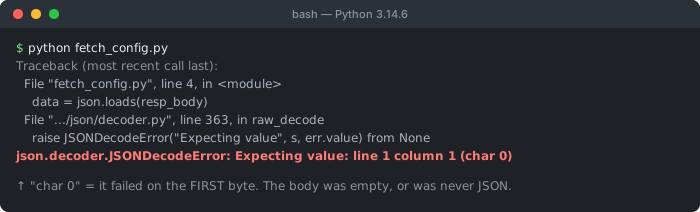
char 0 is the detail worth reading: the decoder failed on the first byte, before it parsed anything. That rules out malformed JSON and points at an empty body or a response that was never JSON — typically an HTML error page.You may also see it raised from the requests library as requests.exceptions.JSONDecodeError, or from response.json() — both wrap the same underlying json.decoder.JSONDecodeError.
What “line 1 column 1 (char 0)” means
The number in parentheses is the character index where parsing failed. char 0 is the very first character. That is the most important detail: the parser failed before reading anything, which means the content is not JSON at all — it is empty, or it starts with something that can never begin a JSON value (a < from HTML, a # from a comment, plain text, and so on).
Contrast this with an error at char 24 or line 3 column 5, which would mean the content is mostly valid JSON with a mistake partway through. At char 0, the whole string is the problem.
Cause 1: The string is empty
Parsing an empty string is the single most common trigger. There is no value at char 0 because there are no characters at all:
import json

text = ""           # empty — maybe an empty file or empty response body
data = json.loads(text)   # JSONDecodeError: Expecting value: line 1 column 1 (char 0)
This frequently happens when reading a file that is empty, or when a network response had no body (a 204 No Content, or a request that returned nothing).
Cause 2: The response is HTML, not JSON
When you call an API with requests and the server returns an error page, the body is HTML — not JSON. response.json() still tries to parse it and fails at char 0 on the leading <:
import requests

response = requests.get("https://api.example.com/data")
# Server returned a 404 HTML page:
# <!DOCTYPE html><html><head><title>404 Not Found</title>...

data = response.json()   # JSONDecodeError: Expecting value: line 1 column 1 (char 0)
This is the Python equivalent of JavaScript’s Unexpected token < in JSON at position 0. The fix is the same idea: check the status code and content type before parsing — a 404 Not Found or 500 Internal Server Error almost always means an HTML error page, not JSON. See the full HTTP status code reference for what each response means.
Cause 3: Reading an empty or wrong file
import json

# The file exists but is empty, or you forgot to call .read()
with open("config.json") as f:
    data = json.loads(f.read())   # empty file → Expecting value (char 0)

# Common slip: passing the file object's name, not its contents
data = json.loads("config.json")  # parses the literal string "config.json" → fails
Use json.load(f) (no s) to read directly from a file object, and confirm the file actually has content.
Cause 4: A None or non-string value
If an earlier step returned None (for example a dictionary .get() that missed, or a function with no return value), parsing it raises the same error:
import json

value = some_dict.get("payload")   # returns None if key is missing
data = json.loads(value)           # TypeError or Expecting value depending on version
How to debug it
Before parsing, print exactly what you are about to parse. repr() shows quotes, whitespace, and emptiness that a plain print() hides:
import requests

response = requests.get("https://api.example.com/data")

print(response.status_code)                       # 200? or 404/500?
print(response.headers.get("content-type"))       # application/json? or text/html?
print(repr(response.text[:200]))                  # the first 200 chars, with quotes

# Only parse once you have confirmed it is JSON
data = response.json()
The fix: check before you parse
A robust pattern checks the status code, confirms there is a body, and wraps parsing so a bad response gives a clear error instead of a raw traceback:
import json
import requests

response = requests.get("https://api.example.com/data")

# 1. Fail fast on HTTP errors (4xx / 5xx)
response.raise_for_status()

# 2. Guard against an empty body
if not response.text.strip():
    raise ValueError("Empty response body — expected JSON")

# 3. Parse defensively
try:
    data = response.json()
except json.JSONDecodeError as e:
    raise ValueError(
        f"Response was not valid JSON: {e}\n"
        f"First 200 chars: {response.text[:200]!r}"
    )
For raw strings or files, the same idea applies: confirm the content is non-empty and wrap json.loads() in try/except json.JSONDecodeError.
References
- json.JSONDecodeError (Python docs)
- json — JSON encoder and decoder (Python docs)
Not sure if your string is valid JSON?
Paste the response body into the validator — it pinpoints exactly where parsing breaks. Everything runs in your browser; nothing is uploaded.
Frequently Asked Questions
What does JSONDecodeError: Expecting value: line 1 column 1 (char 0) mean?
It means Python's json module reached the very first character (char 0) and did not find the start of a valid JSON value. Almost always the string you passed is empty, or it contains something that is not JSON — most often an HTML error page. The char 0 position tells you the content is not JSON at all, rather than JSON with a small mistake.
Why does response.json() raise Expecting value?
Because the HTTP response body was not JSON. The server may have returned an HTML error page (404 or 500), an empty body, or plain text. requests does not check the content before parsing, so response.json() calls json.loads() on whatever came back. Print response.status_code and response.text first to see what the server actually sent.
How do I fix Expecting value: line 1 column 1 (char 0)?
Check what you are parsing before parsing it. Print repr() of the string or response.text. If it is empty, handle that case explicitly. If it is HTML, check the status code and content type — the request likely failed. Only call json.loads() once you have confirmed the body is actually JSON, and wrap it in try/except json.JSONDecodeError.
Does Expecting value mean my JSON file is empty?
Often, yes. Reading an empty file and passing its contents to json.loads() raises this exact error because there is no value at char 0. It also happens if you open the file but forget to call .read(), or if the path is wrong and you accidentally parse a non-JSON string. Check with print(repr(open(path).read())).
Can single quotes cause Expecting value at char 0?
A string that starts with a single-quoted value can give Expecting value. More commonly, a Python dict printed with str() like {'a': 1} fails at char 1 with Expecting property name enclosed in double quotes. JSON requires double quotes for all strings and keys — convert Python objects with json.dumps(), never str().