Quick answer
javac couldn't resolve an identifier — a variable, method, or type. Always read the symbol: and location: lines, not just the one-line message: together they tell you exactly what name it looked for and where it searched, which immediately narrows this down to a typo, a missing import, a variable out of scope, or a method call with the wrong argument types.
The exact error string
App.java:12: error: cannot find symbol
        System.out.println(usrName);
                            ^
  symbol:   variable usrName
  location: class App
1 error
What it actually looks like
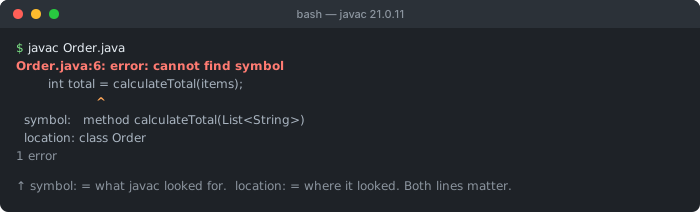
symbol: is what javac looked for (including the argument types it inferred), and location: is where it looked. Read them together before you start editing imports.The symbol: line names exactly what javac was looking for — here, a variable called usrName — and its kind (variable, method, or class). The location: line names the scope it searched: class App means it looked through the entire App class and found nothing matching. These two lines, read together, are almost always enough to identify which of the causes below applies without needing to reason through the rest of the file.
Cause 1: a typo in the identifier name
String userName = "Ada";
System.out.println(usrName);   // ❌ cannot find symbol: variable usrName

// ✅ match the exact spelling of the declared variable
System.out.println(userName);
The simplest and most common cause, identical in spirit to Go's "undefined: X" — javac's identifier resolution is exact-match only, with no fuzzy correction at the compiler level (though most IDEs highlight this live and suggest the closest declared name as you type). A single dropped, transposed, or miscapitalized letter produces this error with the symbol: line showing exactly the misspelled name you wrote, which is often the fastest way to spot the typo — compare it letter-by-letter against the actual declaration.
Cause 2: the variable exists, but in a different (narrower) scope
public void process(boolean valid) {
    if (valid) {
        String result = "OK";   // scoped to this if-block only
    }
    System.out.println(result);   // ❌ cannot find symbol: variable result
}                                  //    (out of scope the moment the block ends)

// ✅ declare it in the outer scope so it's visible where it's needed
public void process(boolean valid) {
    String result = "";
    if (valid) {
        result = "OK";
    }
    System.out.println(result);
}
Every block delimited by { } in Java — the body of an if, for, while, or a bare block — defines its own scope, and a variable declared inside one ceases to exist the instant that block's closing brace is reached. This is easy to miss because the variable is textually right there, a few lines above the failing reference; the compiler, however, only sees a declaration whose lifetime already ended by the time execution (and name resolution) reaches the line that tries to use it.
Cause 3: a method call whose arguments don't match any existing overload
class Calculator {
    int add(int a, int b) { return a + b; }
}

Calculator calc = new Calculator();
calc.add(1, 2, 3);   // ❌ cannot find symbol
                      //   symbol: method add(int,int,int)
                      //   location: class Calculator

// ✅ call it with the argument types/count an actual overload accepts
calc.add(1, 2);
// or add a genuinely new overload if 3-argument addition is intended:
int add(int a, int b, int c) { return a + b + c; }
This is the case most likely to look like a compiler mistake at first glance — the method visibly exists in the source, right there in the class. But the symbol: line is precise: it names not just add but add(int,int,int), the exact signature it looked for and failed to find, because javac performs overload resolution against the specific number and types of arguments at the call site. A method with the right name but a different parameter list simply isn't a match; from the resolver's perspective, the three-argument version of add genuinely doesn't exist yet.
Cause 4: a type used without its import (and it's not in java.lang)
public class App {
    public static void main(String[] args) {
        List<String> names = new ArrayList<>();   // ❌ cannot find symbol
    }                                                //   symbol: class List
}                                                     //   location: class App

// ✅ import the types from java.util
import java.util.List;
import java.util.ArrayList;
Only the classes in java.lang (String, Object, Integer, and a handful of others) are available without an explicit import — everything else, including extremely commonly used types like List or ArrayList from java.util, must be imported (or referenced by its fully-qualified name) in every file that uses it. The location: line for this variant typically names the current class itself, since the compiler is treating the bare type name as if it should already be resolvable and finding nothing that matches within the file's own visible scope.
Common causes at a glance
| Symbol line shows | Likely cause | Fix |
|---|---|---|
variable usrName | typo, or referenced before declaration | check spelling and declaration order |
variable result (visibly declared above) | declared inside a narrower block scope | move the declaration to the enclosing scope |
method add(int,int,int) | no overload matches these exact argument types | call with matching arguments, or add the overload |
class List / class ArrayList | missing import java.util.* | add the specific import |
Why this happens: javac reports what it searched, not just what it expected
Unlike a runtime NullPointerException, which tells you where a null value was dereferenced but not why it was null, javac's "cannot find symbol" is deliberately structured to report the search itself: exactly what name and kind it was resolving (the symbol: line), and exactly where it looked (the location: line). This design reflects how Java's name resolution actually works internally — every identifier reference is resolved against a specific enclosing scope, and printing that scope explicitly turns an otherwise generic "not found" message into a precise diagnostic. It's also why a single early typo can cascade into a wall of errors: once one identifier fails to resolve, the compiler doesn't know its type, and everything downstream that depended on that unknown type can independently fail to resolve too — fixing the very first "cannot find symbol" in a long error list and recompiling is usually far more productive than trying to address every reported error individually.
Debugging checklist
- ✓ Read the
symbol:andlocation:lines, not just the top message - ✓ If it names a variable that's visibly declared nearby, check whether it's inside a narrower
{ }block - ✓ If it names a method with a full parameter list, confirm your call's argument types actually match an existing overload
- ✓ If it names a class, confirm the import statement for that type's package is present
- ✓ Fix the first cannot-find-symbol error in the file first, then recompile — later ones often disappear on their own
Frequently Asked Questions
What does "error: cannot find symbol" mean in Java?
javac's compiler tried to resolve an identifier — a variable, a method call, or a type name — and couldn't find a matching declaration anywhere it looked. The error always prints two extra lines beyond the message itself: "symbol:" (exactly what it couldn't find) and "location:" (the class or scope it searched in), which together narrow down the cause far faster than the one-line message alone.
Why does javac print both 'symbol' and 'location'?
The "symbol" line tells you exactly what name and kind (variable, method, class) it was looking for, including the expected parameter types for a method call. The "location" line tells you which class or scope it searched. Together they distinguish, for example, a genuinely nonexistent method from a method that exists but takes different argument types, or a variable that exists but in a different, inaccessible scope — three very different bugs that would otherwise look identical from the error message's first line alone.
Why does this happen for a method I can see is defined in the class?
The most common reason is an argument-type mismatch: you're calling a method with arguments of types that don't match any of its overloads. javac performs overload resolution based on the exact argument types at the call site, and if none of the declared overloads accept what you're passing, the method "doesn't exist" from the compiler's perspective even though a method with that name is clearly present in the source.
Can a variable declared inside an if block or loop cause this outside it?
Yes — a variable declared with a block ({ }), including the body of an if, for, or while, only exists within that block's scope in Java. Referencing it after the closing brace, even a few lines later in the same method, produces "cannot find symbol" because from the compiler's point of view the variable never existed at that point in the code.
Does a missing import cause "cannot find symbol" for a type name?
Yes, when the referenced type isn't in java.lang (which is imported automatically) and isn't in the same package as the file using it. Unlike an unresolved variable or method, a missing-import case for a type usually also shows a location referencing the current class, since the compiler is looking for the type name as if it should already be visible, and no import statement told it where else to look.
Why does this cascade into dozens of errors from one typo?
javac attempts to continue parsing and type-checking after the first cannot-find-symbol error to report as many real issues as possible in one pass, but once one identifier fails to resolve, everything downstream that depended on its (unknown) type can also fail to resolve, cascading into many more reported errors. Fixing the very first cannot-find-symbol in the file and recompiling often makes most or all of the subsequent errors disappear on their own.
References
- Java Language Specification: Names (Oracle)
- javac command reference (Oracle)
More Go, Rust & Java errors
Browse the full reference for Go, Rust, Java, and other backend language errors — exact message, cause, and fix.