Quick answer
Go's module resolution walked go.mod → local module cache → the network and never found a module providing that package. Try go mod tidy first — it fixes the overwhelmingly common case of a genuinely new import that just hasn't been added to go.mod yet. If that doesn't work, check for a typo in the import path or a private repository your Go tooling can't authenticate against.
The exact error string
$ go build ./...
main.go:5:2: no required module provides package github.com/lib/pq; to add it:
	go get github.com/lib/pq

// or, on an older Go toolchain / different code path:
go: cannot find module providing package github.com/lib/pq

// and if there is no go.mod at all, the same line carries a different tail:
main.go:3:1: no required module provides package github.com/lib/pq: go.mod file
not found in current directory or any parent directory; see 'go help modules'
What it actually looks like
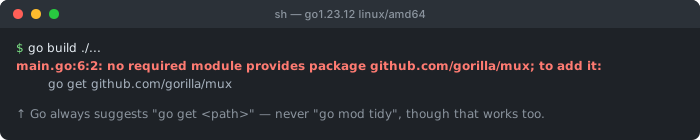
go1.23.12. Note what the suggestion actually says: go get <path>. go build, go run, go test and go vet all print this identical line — none of them suggests go mod tidy, even though that also fixes it.All three shapes describe the same underlying failure — the resolution process below never located a module for the imported path — but the modern form tells you the fix inline. One detail worth pinning down, because it trips people searching for the message: the suggestion Go prints is always go get <path>, never go mod tidy. Verified on go1.23.12, where go build, go run, go test and go vet all emit the identical to add it: go get <path> line. go mod tidy remains an excellent fix — it sweeps every unresolved import at once rather than one at a time — it just isn't what the compiler suggests.
The module resolution walk, visually
The three stages run in order and each can independently fail. Which one failed narrows the fix: missing from go.mod → go mod tidy; not cached and fetch fails → check the import path spelling, network access, or private-module auth.
Cause 1: the import is new and genuinely just missing from go.mod
// you just added this import, but never ran a get/tidy step:
import "github.com/lib/pq"

// ❌ go.mod has no matching require line yet — stage 1 fails immediately

// ✅ let Go resolve it and update go.mod + go.sum for you:
go get github.com/lib/pq
// or, to resolve every unresolved import in the whole module at once:
go mod tidy
This is the overwhelming majority case, and it's a normal, expected part of adding a new dependency — Go's module system requires every dependency to be explicitly recorded in go.mod (with a specific version) before it can be resolved, rather than implicitly trusting whatever happens to be importable. Writing the import line in your source is necessary but not sufficient; go get or go mod tidy performs the separate step of actually recording that dependency and its resolved version.
Cause 2: a typo or wrong path segment in the import string
// ❌ extra or wrong path segment — this exact string has no
//    corresponding module, so all three resolution stages fail:
import "github.com/gorilla/mux/v2"

// ✅ match the module's actual, published import path exactly
//    (check the module's own go.mod / README for the correct one):
import "github.com/gorilla/mux"
Unlike a typo in a local identifier (which produces an "undefined" error after successful compilation of the surrounding file), a typo'd import path fails at a much earlier stage — the module resolution machinery itself, before your code is even type-checked. Because module paths often mirror a hosting URL, it's tempting to assume "it exists on GitHub" guarantees resolvability, but Go matches the import string exactly against a module's declared path; an extra version suffix, a wrong case, or a subdirectory that isn't itself a separate module all produce this identical error.
Cause 3: a private repository the tool can't authenticate against
# tell Go this module path is private, so it skips the public
# checksum database (sum.golang.org) and proxy (proxy.golang.org)
# for it, going straight to the source instead:
go env -w GOPRIVATE=github.com/mycompany/*

# then make sure the underlying fetch (git over https) can actually
# authenticate — e.g. via a configured git credential helper or a
# .netrc entry for your private host
By default, Go resolves modules through the public module proxy and verifies them against the public checksum database — neither of which has any way to see a private repository, so the network stage fails exactly as if the module didn't exist anywhere. Setting GOPRIVATE (or the more granular GONOSUMCHECK/GOFLAGS equivalents) tells Go to bypass the public infrastructure for matching paths and fetch directly via the underlying version control tool, which then needs its own working authentication (SSH key, a git credential helper, or a .netrc entry) completely independent of Go itself.
Cause 4: an empty local cache — the classic "works on my machine, fails in CI"
# confirm what's actually cached locally vs. what a clean
# environment (like CI) would see:
go env GOMODCACHE
ls $(go env GOMODCACHE)/github.com/

# reproduce the CI failure locally by clearing the cache first:
go clean -modcache
go build .   # now this machine behaves like a fresh CI runner
A developer's machine accumulates a populated module cache over weeks or months of work, so a dependency that was fetched once loads instantly from disk on every subsequent build — masking network or authentication problems entirely. A CI runner typically starts with an empty cache every run (unless explicitly configured to persist one), so it must actually execute the network-fetch stage from scratch; if that stage is the one that's broken (a blocked outbound connection, an unconfigured private-module credential, a proxy unreachable from the CI network specifically), the exact same import that "just works" locally fails reliably in CI.
Common causes at a glance
| Situation | Which stage failed | Fix |
|---|---|---|
| brand new import, first build after adding it | stage 1: not in go.mod | go get <path> or go mod tidy |
| package "definitely exists" on GitHub | stages 1–3: the exact import string doesn't match a real module path | check the module's published import path exactly |
| internal/company-private module | stage 3: network fetch has no credentials | set GOPRIVATE + configure git auth |
| works locally, fails only in CI | stage 2/3: CI's cache is empty and its network path is blocked | reproduce with go clean -modcache; fix CI network/auth |
Debugging checklist
- ✓ Run
go mod tidyfirst — it resolves the majority of cases in one step - ✓ Double-check the import path against the module's own published path (README, its own
go.mod) - ✓ If it's an internal/private module, confirm
GOPRIVATEis set and git auth actually works - ✓ Reproduce a CI-only failure locally with
go clean -modcachebefore assuming it's environment-specific magic - ✓ Check
go env GOPROXYif your network requires a specific internal proxy
Frequently Asked Questions
What does "cannot find module providing package X" mean?
Go's build tooling parsed your import statement, then tried to resolve which module (a versioned collection of packages) actually provides that import path — checking your go.mod requirements, the local module cache, and finally the network — and none of those stages produced a module containing that package.
Why does "go mod tidy" sometimes fix this instantly?
go mod tidy scans your source code for every imported package, resolves each to its owning module and an appropriate version, and adds any missing require directives to go.mod (removing unused ones too). If the only problem was a genuinely new import that simply hadn't been added to go.mod yet, this command performs exactly the missing resolution step and fixes it in one pass.
Why does this happen for a package I'm sure exists on GitHub?
The most common cause is a mismatch between the import path in your code and the module's actual path as published — often a capitalization difference, a missing or extra path segment, or referencing a subdirectory that isn't actually its own importable package. Go's module resolution matches import paths exactly; "it exists on GitHub" doesn't guarantee the exact string in your import statement is a valid, resolvable module path.
Can a private repository cause this error?
Yes — if the module lives in a private GitHub/GitLab repo or a private module proxy, the Go tool has no credentials to fetch it by default and the resolution fails at the network stage exactly as if the module didn't exist at all. Fixing it requires configuring GOPRIVATE (to skip the public checksum database for that path) and GOFLAGS or git credential configuration so the fetch itself can authenticate.
Does deleting go.sum fix this error?
Rarely, and it isn't the recommended first step — go.sum records cryptographic checksums for modules already resolved into go.mod, so if the module isn't resolvable at all, go.sum wasn't the blocker. Deleting it can occasionally help recover from a genuinely corrupted checksum entry, but running go mod tidy (which regenerates both files correctly) addresses the actual resolution gap directly.
Why does this fail in CI but work on my machine?
Your machine has a populated local module cache ($GOPATH/pkg/mod) from previous work, so previously-resolved modules load instantly without hitting the network again. A fresh CI container has an empty cache and must fetch every dependency from the network or a configured proxy — if that network path is blocked, unauthenticated for a private module, or the proxy is unreachable from CI specifically, the exact same import fails there while succeeding locally.
References
- Go Modules Reference (go.dev)
- Managing dependencies (go.dev)
More Go, Rust & Java errors
Browse the full reference for Go, Rust, Java, and other backend language errors — exact message, cause, and fix.